

A practice log can look complete on screen and still leave useful information out of its export. The number of sessions might be right while a long note is shortened, a date loses its time, or a recording stays behind. We exported the same four example sessions through Practis, our app, and Mirubato to see exactly what the resulting files contained.
Keep the CSV for checking totals and retaining text; treat a PDF as a reading copy. In our examples, both CSVs preserved all four sessions and 54 minutes. Their fields and note formatting differed. Practis's PDF matched the total, but shortened long notes and did not render our Japanese text correctly.
Checked 30 September 2026 in desktop Chromium, with an English-US browser locale and UTC time zone. These are export tests, not a claim that one app can restore the other's files.
Start with a small log you can check by hand
You need access to your own log, somewhere to save its files, and a text editor or spreadsheet for inspection. No paid spreadsheet is needed to examine our examples. Practis requires an account for your own saved history; the Mirubato web logbook could be used without signing in for this test. Native mobile exports, paid-plan changes and account recovery are outside the comparison.
We used the actual Practis History and export components with isolated sample records, and the public Mirubato logbook with local-only sample records. No real student's records were involved. The examples deliberately include two sessions for one piece on one day, punctuation, accented names, an empty note, a long note and Japanese text. That makes a more revealing check than exporting four rows of plain English titles.
The whole example is small enough to reconcile without trusting either app's dashboard. All titles and composer names below are invented for this test.
25 + 10 + 12 + 7 = 54 minutes
Download the example exports and explanation (ZIP, about 5 KB). It contains both full and piece-filtered CSVs, Mirubato's JSON and Practis's unaltered PDF. The PDF is included with its observed limitations so you can compare it with the complete text in the CSV.
What survived each export?
The main difference was the shape of the exported record. Practis's CSV includes session type and mood; Mirubato's CSV includes instrument. Mirubato's JSON retains more of the underlying entry structure than either CSV. More fields can be useful, but they only help if you know what the receiving tool expects.
| Check | Practis CSV | Mirubato CSV | Mirubato JSON |
|---|---|---|---|
| All sessions | 4 rows, 54 minutes | 4 rows, 54 minutes | 4 entry objects, 54 minutes |
| Time value | Numeric Minutes column | Hours:minutes, such as 0:25 | Numeric duration in minutes |
| Date | 2026-09-28; no session time | 9/28/2026 in our browser; no session time | Full timestamp retained |
| Note text | Complete, with line breaks collapsed to spaces | Complete, including line breaks | Complete, including line breaks |
| Extra context in our examples | Type and mood; focused bar numbers absent | Instrument; type, mood and bar numbers absent | ID, type, mood and nested measures field retained |
| Scores and recordings | No attached files | No attached files | Entry data, not a media archive |
Both CSV files kept Écho étude, Zoë Example and the Japanese note text. Both also retained the final END-OF-NOTE marker in the long entry. The empty note remained empty. Those details matter if your notes contain repertoire titles in several languages or a precise instruction you expect to find months later.
The Practis CSV begins with a UTF-8 byte-order mark; the Mirubato CSV in this test does not. Both files contain UTF-8 text. If accented text looks wrong in a spreadsheet, check the import encoding before concluding that the export has lost it. Keep an untouched copy of the original download while investigating.
Check the selection as well as the file
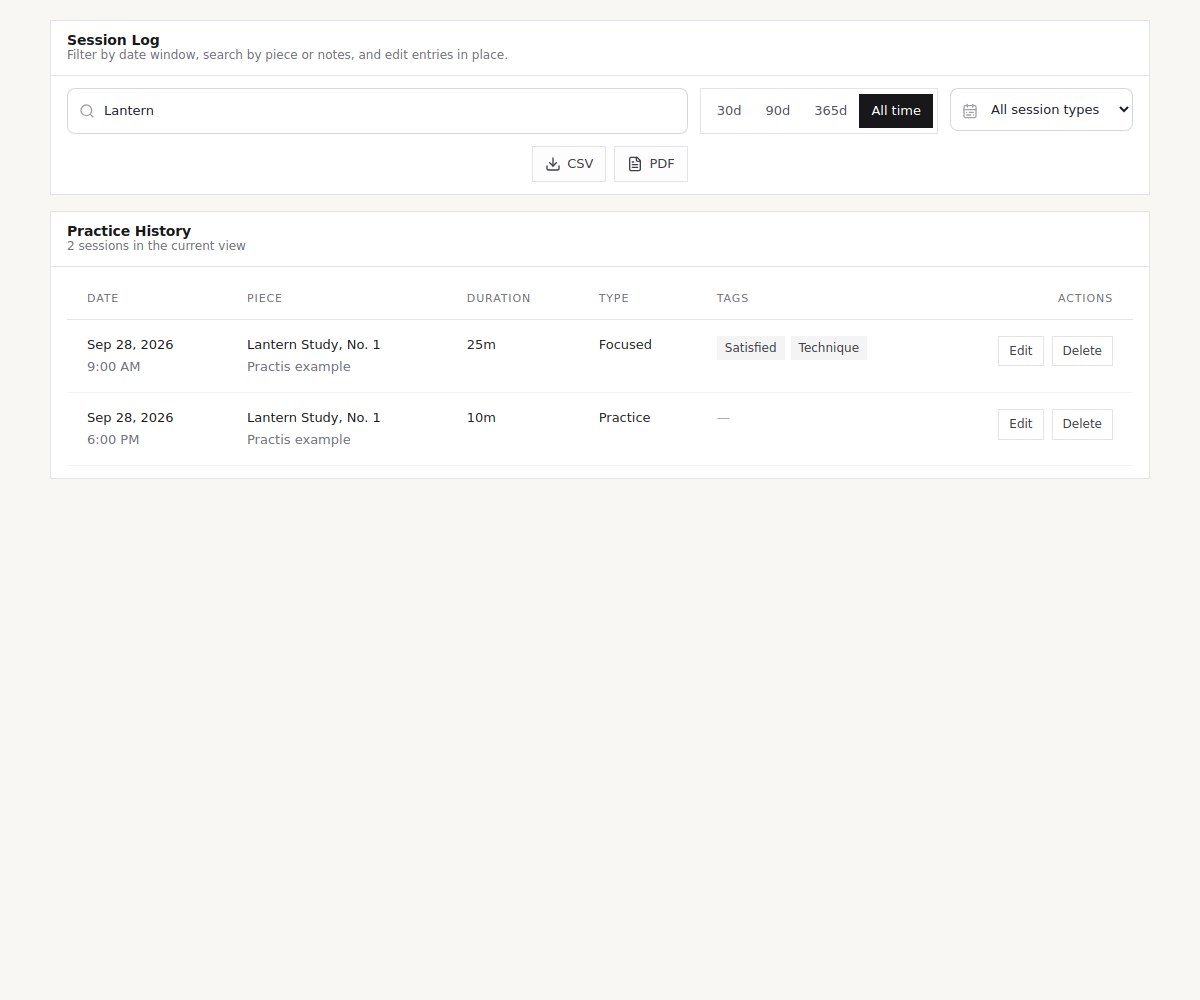
A total is only meaningful when you know which sessions it describes. We first exported all four examples, then selected just Lantern Study, No. 1. The expected second result was two sessions and 35 minutes. Both tools produced that result in their filtered CSVs.
In Practis, open History, choose the period, and review the search and session-type controls before pressing CSV or PDF. For our complete sample we selected All time; searching for Lantern then restricted the export to the two matching entries. The export receives the filtered list, rather than merely the rows on the current pagination page. We exercised the two-row filter, not a large-history pagination stress test.
In Mirubato, the tested route was Logbook → Data → Table. Its quick period controls and Select Pieces chooser sit above the export buttons. Selecting Lantern Study produced the same two-session subset. Do not confuse a calendar display's current week with a guarantee about the file's scope: open the downloaded file and check its first and last dates.
A small piece-filter check catches an easy mistake: exporting everything, then assuming the file follows the piece you were viewing elsewhere. It also catches the reverse problem, where a forgotten search hides most of your history. Name the file with its intended scope, such as practice-log_2026-09_lantern.csv, while retaining the app's original download as a reference.
If you practise several instruments, include that distinction in your checking. Our multiple-instrument logging guide explains how to organise the sessions. Here, the important export difference is that Mirubato's CSV has a dedicated instrument column and Practis's current CSV does not.
Reconcile minutes before comparing progress
Start with the plain arithmetic: four rows and 54 minutes, then two rows and 35 minutes for the selected piece. Count sessions, not unique dates or unique pieces. The two Lantern entries are separate sessions even though their title and date are identical.
Practis's Minutes column is directly numeric in this example: 25, 10, 12 and 7. Mirubato's CSV writes the same durations as 0:25, 0:10, 0:12 and 0:07. Those are hours and minutes. Interpreting them as minutes and seconds would understate the practice time by a factor of 60.
A duration check you can do without a formula: a known 25-minute session must still mean 25 minutes after import. For an hours:minutes value, multiply the first number by 60 and add the second. Thus 1:15 means 75 minutes.
Spreadsheets can assign their own meaning to a colon-separated value or a date. Microsoft’s CSV import guidance explains that ordinary opening uses the program's default format settings; its From Text/CSV import route provides more control. Inspect the preview and column types before loading. This is a documented import route, not a claim that we executed this comparison inside Excel.
For Mirubato's JSON, the duration is already a number of minutes. Do not apply the CSV's colon-parsing rule to it. Similarly, keep the timestamp's time-zone information if you later group sessions by day. Our UTC test did not exercise travel, daylight-saving changes or a session spanning midnight; those deserve a separate check with a date you can recognise in your own history.
Read the note that is most likely to break
The first note contains a comma, the quoted word “quiet” and a line break. In CSV, quotation marks around a field protect a comma from being mistaken for a new column; a quote inside that field is doubled. Do not remove those marks from the raw file to make it look neater. A CSV-aware importer uses them to reconstruct the original text.
For the same reason, counting lines in a text editor is not always the same as counting sessions. Mirubato preserves a line break inside a quoted note. That one record occupies more than one visible text line. Practis collapses that whitespace, preserving the words but changing their layout. If your notes use separate lines for separate tasks, this distinction may affect how pleasant the exported journal is to read.
The Practis PDF needs a more important qualification. Its four-session, 54-minute heading was correct, but the fixed-width table shortened long notes. The final marker disappeared. The accented title and composer displayed correctly; the Japanese characters did not. We checked both the extracted text and the rendered page, rather than assuming a text-extraction problem.
That PDF can serve as a quick attendance or time summary after you inspect it. It should not be your only copy of detailed multilingual practice notes. Use the CSV for the complete text in this tested version. If you send a PDF to a teacher, read the actual attachment before sending it; a correct total at the top does not establish that every instruction below is intact.
We found CSV and JSON export controls in Mirubato's tested Data view, not a dedicated PDF export there. A browser's Print to PDF command would be a separate workflow and is not included in these results.
Keep recordings, scores and annotations separately
A log entry can describe a passage without containing the score or audio needed to understand it. Practis's CSV marks the 25-minute example as a focused session, but does not export its bar range. Mirubato's JSON keeps the synthetic entry's nested measures value; its CSV leaves that field out. Neither fact turns the file into a complete practice workspace.
Our samples did not include uploaded media. The resulting CSVs and JSON contain no audio, score PDFs or annotation files, and the test does not establish how either app exports those separately. A link or an identifier would still need its target. Keep your original files and use the relevant product's supported download or backup process for material you want to preserve.
The small archive below separates the jobs. This is a suggested folder arrangement for your own files, not an import format for either app.
Session records
Original CSV or JSON download
Checked reading copy, if useful
A note of scope, dates and duration units
Musical material
Original recordings
Scores you are entitled to retain
Supported annotation exports and a file index
For recording filenames and a reusable index, see our piece-and-passage recording workflow. Keep any private notes or recordings in storage appropriate for their contents. Before sharing a log, inspect the free-text columns as well as the title; an innocent filename can conceal a note you did not intend to send.
What this tells you when choosing a practice tracker
Practis gives you a straightforward numeric-minute CSV alongside a compact PDF summary. The CSV includes type and mood, but omits session times, a dedicated instrument field and focused bar ranges. Its current PDF limitations make the CSV the important file to keep when note fidelity matters.
Mirubato's guest workflow lets you inspect CSV and JSON output before creating an account. The CSV retains instrument and multiline notes; the JSON carries IDs, timestamps and more entry detail. That richer structure may help a future conversion, but we did not test a restoration or a receiving app. Local guest data also deserves an exported copy before you clear browser storage or move to another browser.
If you want Practis's piece history alongside your practice tools, create a Practis account and try the workflow with a small log first. Exportability should be one part of that choice. The files here show specific strengths and limits, not an overall ranking of the two apps.
Before relying on your own archive, check one known session, one filtered total and your longest note. Keep the original download after opening it. Those few checks tell you considerably more than the presence of an Export button.


