The recording you need is often somewhere between “New Recording 47” and “final ending better.” You remember playing the passage, but not which file contains the slower attempt, whether it used the revised score, or what you wanted to listen for. A small amount of context attached to each take makes those recordings much easier to use.
Organise by piece first, then identify the passage, score version, tempo and take. Keep the original audio, use a short index for details that will not fit comfortably in a filename, and compare recordings made under reasonably similar conditions.
You need: recordings you own, a file manager or recording app, and a text editor or spreadsheet for the optional index. The example files are free and need no account. The Practis route uses a signed-in account; audio recording is available on Free within its storage allowance. We checked the controls and plan limits on 30 September 2026.
Start with the question you want the archive to answer
“Find something from last week” is an easy search. “Find two attempts at bars 9–16 of the same arrangement, both at a quarter note of 60” is more demanding. The second question is also more useful when you want to hear what changed.
A date tells you when a recording was made. It does not tell you whether the musician started cold, had already repeated the passage ten times, played hands separately, or stopped to repair a wrong note. You do not need a detailed report for every take, but the condition that matters to your comparison should survive until the next session.
Choose one current piece and gather a few existing recordings. Leave the originals where they are for now. Identify a passage you have recorded more than once, then listen just far enough to establish where each file begins and ends. If the bar numbers are uncertain, write a recognisable location such as “second phrase, after the repeat.” A confident-looking wrong label makes the archive harder to trust.
This is a retrieval task. It does not require changing your microphone or rerecording your repertoire. If the recordings themselves are difficult to hear, our practice-recording guide covers capture and listening. Here, the aim is to recover a specific attempt without opening every file in the folder.
A filename that survives outside the recording app
Use a name that remains understandable after a file is copied to another device. The example below puts the date first so files sort chronologically inside a piece folder. It also carries the score version and passage, because those details are easily lost when recordings move between apps.
2026-09-23_lantern-study_v1_b009-016_q060_t02.wav- 2026-09-23
- The recording date, in year-month-day order.
- lantern-study
- A stable, short name for the piece.
- v1
- The score or arrangement version.
- b009-016
- Bars 9–16. Use “full” for a complete run.
- q060
- Quarter note = 60. The beat unit matters.
- t02.wav
- Take 2, retaining the file's real extension.
There is nothing special about these abbreviations. A name such as “Lantern Study, ending, 23 September, 60 BPM, take 2” can work well inside an app. The compact form becomes useful when filenames need to remain legible across folders, email attachments and an index.
Keep the extension unchanged. Renaming an M4A recording to end in WAV does not turn it into a WAV file. Use whatever format your recorder actually produced. Our downloadable examples happen to be WAVs; your phone recordings need not match them.
Version labels deserve a little care. Use v2 when the music or arrangement changes enough to affect the comparison, not because you added a pencil reminder to the same notes. For published repertoire, an edition, arranger or movement name may be more informative than a version number. Two files both labelled “Prelude” are not specific enough if you have several preludes in your collection.
Keep longer context in an index rather than extending the filename indefinitely. Our CSV uses one row per recording, with columns for filename, piece, version, passage, quarter-note tempo, take, recording date and context. You can open it in a spreadsheet or read it as ordinary text. It contains no formulas or macros, and you can remove fields you do not use.
A location column can be helpful if files live in more than one place. Record a folder path or a clear app/folder name. Check links after moving files: an index row pointing at yesterday's location is not a working reference. If you share the index, a path on your laptop will not automatically open on someone else's device.
Six takes, but only one straightforward comparison pair
We made a small example around two original study names. The download contains six synthesized demonstration recordings, an example index and a blank index. They illustrate organisation and retrieval, not a student's improvement; takes 1 and 2 deliberately contain the same notes at the same tempo.
Suppose the question is: “Which two takes show the ending of Lantern Study, version 1, at quarter note = 60?” Read the labels before deciding which files to play.
- 01
21 September · Lantern Study · v1
Bars 9–16, quarter note = 60. This is the first reference take.
- 02
23 September · Lantern Study · v1
Bars 9–16, quarter note = 60. This matches the first take's piece, passage, version and tempo.
- 03
24 September · Lantern Study · v1
The same bars at quarter note = 72. Useful for checking the faster trial, but it changes the tempo condition.
- 04
25 September · Lantern Study · v1
A full run at quarter note = 60. The ending follows the first eight bars rather than a fresh start at bar 9.
- 05
27 September · Lantern Study · v2
Bars 9–16 at quarter note = 60, with a revised ending. Matching numbers do not make it the same score version.
- 06
28 September · Bridge Study · v1
Bars 9–16 at quarter note = 60, but a different piece. A passage label alone would mix it into the wrong group.
The first two files are the cleanest pair for the stated question. That does not make the others bad recordings. Take 3 answers a tempo question; take 4 answers a continuity question; take 5 belongs to the revised material. Good organisation leaves these distinctions visible.
With your own playing, a matching label still does not prove equal conditions. A close microphone can make one recording sound more detailed. A different piano changes the sound. A warm-up or a lesson immediately before the take can change what the result means. Add the relevant condition to the context field instead of trying to encode everything in the title.
Choose between a file archive and a piece-linked practice journal
A folder system is a good fit when you already record in a phone app, camera or DAW and want to keep those original files. A piece-linked journal is useful when recordings belong beside repertoire and practice notes. Practis is our app; the walkthrough below shows its actual recording-list controls with example data.
For a folder archive, start with one folder per piece or work-and-movement. Keep the index at a predictable level and separate your working copies from the originals. This is a proposed arrangement, not a requirement to reorganise every old file today:
Practice recordings/
  recording-index.csv
  Lantern Study/
    originals/
    listening-copies/
  Bridge Study/
    originals/
The distinction between originals and listening copies matters when you trim the silence, reduce a video to an audio file or make a short excerpt for someone else. Give the derivative a name that identifies its source take. Otherwise a thirty-second edit can later be mistaken for an uninterrupted performance.
On iPhone, Voice Memos already provides recording folders. Apple's current folder instructions explain selecting recordings and moving them into a named folder. A piece folder is a sensible starting point; you do not need another app merely to stop leaving every take in one undifferentiated list.
Apple also documents renaming recordings and searching their names. Use stable piece and passage terms so that a later search can find them. The filename convention above can be shortened for the on-screen title. Do not rely on speech transcription to identify which music you played.
A folder does not supply all the context on its own. You still need to remember whether a take was hands separately, from memory or at a changed tempo. An index or a short note beside the recording handles that. If maintaining those separate records becomes the part you regularly omit, a practice app that keeps the piece association and memo together may be more useful.
Attach a Practis take to the right piece and passage
In Practis, the recording list can show a piece title, date, duration, section label, bar range and memo. The Filter by piece control narrows the loaded list. There is no need to type the full filename convention into every field: the piece association and recording date already carry part of the identity.
Start by choosing the piece you mean. In our example, selecting Lantern Study leaves five of the six takes visible; Bridge Study drops out. The remaining work is identifying the version and passage within that group.
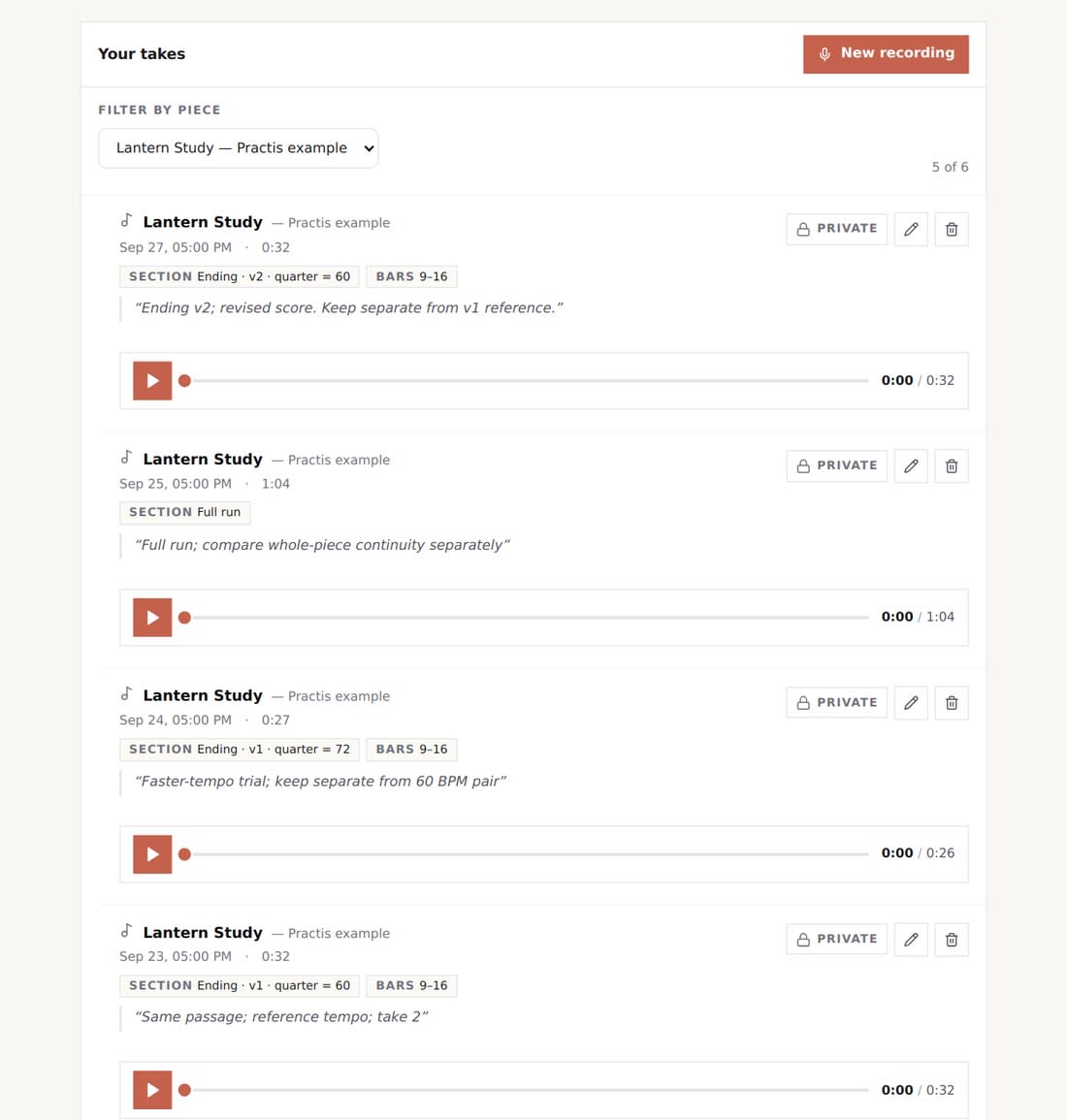
Use the pencil control on a saved take to check its piece association and edit the section, bar range and memo. For take 2, a useful section label is “Ending · v1 · quarter = 60,” with bars 9 and 16 in the range fields. Keep the memo for context that you will want when listening later.
The example capture below is intentionally ordinary. It shows enough information to identify the take, a private/shared state and a playback control. It does not need a grade or an automatically generated judgment to help you retrieve the right recording.
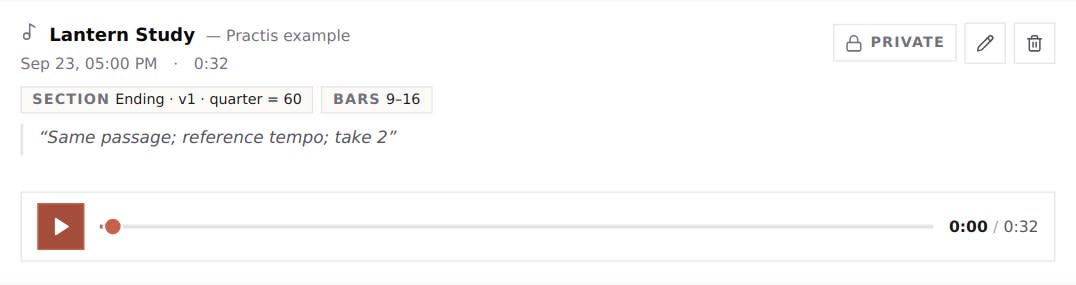
After saving an edit, check the displayed result. An incorrect piece association is more disruptive than an imperfectly phrased memo because it places the take under the wrong filter. If you use a custom piece, make its title specific enough to distinguish it from another arrangement of the same tune.
The piece filter does not perform every comparison for you. The current view does not provide separate version or tempo filters, an automatic best-take selector, or a synchronised A/B player. Read the section labels and memos, play one take, pause it, and then play the other. Do not leave two players running and mistake their overlap for something in the performance.
For a large archive: the current recording list loads the latest 200 takes and filters that loaded set by piece. It is not an unlimited, paginated archive browser. A missing older take should not be interpreted as proof that it was deleted; retain an independent index and source files when long-term retrieval is important.
Keep an existing phone or DAW archive separate unless the app explicitly offers an import route for those files. The recording view used here does not offer a bulk import for an old Voice Memos library. This walkthrough demonstrates organising takes already in Practis, not migrating six local WAV files into an account.
Compare one question, then leave a usable note
Once you have found a suitable pair, make the listening question narrow enough to answer. “Which is better?” invites a vague judgment. “Does the left hand cover the melody at the start of bar 12?” tells you where to listen and what relationship to examine.
Reference take
Lantern Study v1
Bars 9–16
Quarter note = 60
Take 01
Later take
Lantern Study v1
Bars 9–16
Quarter note = 60
Take 02
Same identification fields. Now check the recording conditions and listen for one specific change.
For a real comparison, use roughly comparable playback levels. A louder file can seem more forceful even when the balance within the music is unchanged. If one recording clips or has a much noisier background, note that limit and avoid drawing a detailed tone judgment from it.
A full run can also be worth comparing with a passage take, provided you keep the question clear. You might want to know whether the transition into the ending survives when the preceding music is included. That is a different test from repeating the ending after a pause. The archive should let you find both versions without pretending their conditions match.
Leave one observation and, if useful, one next action. For example, a musician who actually heard this in their take might write:
This is an illustrative note, not a finding about our synthesized files. Its useful feature is the location and the audible relationship. “Much better” may feel satisfying when you save it, but it gives the next session very little to work with.
When you do hear a clear improvement, identify what changed just as specifically. Keep a reference take long enough to revisit it. The purpose of the recording journal is to make your own evidence accessible; our broader post on tracking practice progress over time considers how recordings fit beside other kinds of practice records.
Storage, sharing and a manageable backlog
Recording organisation and storage capacity are separate problems. As checked on 30 September 2026, Practis Free includes audio recording within a 100 MB shared media pool; individual Pro increases that pool to 3 GB and permits video. Scores and recordings share the allowance. These app labels use binary units internally, and the amount of recording time they hold depends on the actual files.
Check usage before a recording you need to keep. A short text memo does not take the place of the audio, and a CSV index does not back up the files it names. For the broader plan decision, including repertoire limits and current subscription options, use our Free-versus-Pro walkthrough and the current pricing page.
For files already on your device, make a separate copy before reorganising or deleting anything important. Open a copied file and confirm that it is playable and complete. If a recording exists only inside an app, check that app's supported export or download options before relying on another location as its backup. A listing of filenames is not evidence that the audio has been copied.
Sharing also needs a deliberate choice. Practis marks takes private unless sharing is enabled for that recording. Check the visible state before sharing, and remember that sending someone an independent copy is different from changing an in-app sharing switch. Do not include someone else's lesson conversation or performance without the appropriate permission.
There is no need to catalogue several years of files before making the system useful. Start with the piece you are practising now. Identify one reference take and one recent take, label their passage and conditions, and add the pair to the index. At the next session, check whether you can find both without opening unrelated recordings. That is a concrete first result to build on.