A practice plan becomes worth paying for when it supports work you actually do: a larger repertoire, regular video takes, more stored media or continued use of Cue. A short piece list and an ordinary practice diary need much less. Practis is our product; here is how its individual Free and Pro plans fit three different weeks of practice.
Start with Free if your collection fits within five pieces and you want to log practice, keep notes and make audio recordings within the included storage. Pro removes the normal piece-count restriction, increases media capacity, permits video recording and keeps Cue available beyond the Free account's seven-day window.
Current website prices are $0 for Free, $4.99 per month or $39.99 per year for Pro. Monthly Pro currently advertises the first month free. That billing offer is separate from Cue's seven-day access on a Free account.
Individual-plan details checked 28 September 2026. These are illustrative practice weeks, not customer case studies. Current prices and purchase terms are on the pricing page.
Which limit would you actually encounter?
There is no single “free versus paid” switch covering every feature. Piece count, media storage, recording format and Cue access have different rules. The useful starting point is the first task that your present account cannot comfortably support.
- A small repertoireFree fits a collection of up to five pieces. Keep using it if the diary and available media capacity cover your work.
- More piecesPro fits a larger working collection without repeatedly removing repertoire to make space.
- More recordingsAudio is included on Free. Consider Pro for video or when the shared score-and-recording storage allowance is too small.
- Ongoing Cue useFree accounts get a seven-day window from signup. Pro continues access after that window.
Someone who practises for an hour a day on three pieces may still have a modest collection. Someone rehearsing ten short accompaniments can reach the piece limit with much less daily playing. Practice duration alone is a poor way to decide which plan fits.
The same applies to recordings. One long video can consume more storage than several short audio takes, and uploaded scores share that space. Looking at the actual collection and media usage is more useful than upgrading because a feature list is longer.
Week one: three pieces and a useful practice record
Imagine an adult learner working on a prelude, a short dance and a song arrangement. They practise four times during the week and want to arrive at the next lesson knowing what improved and what still needs attention. None of that requires a large repertoire database.
With Free, they can keep those three pieces in their collection, log sessions and leave specific notes. They can also make audio recordings, provided there is room in the shared storage allowance. The number of sessions in this example does not consume the five-piece allowance again: four sessions on a prelude are still work on one collection item.
Example: four sessions, three pieces
- Monday
- Prelude, 20 minutes. Note where the left-hand pattern loses evenness.
- Wednesday
- Dance, 15 minutes. Work on the second phrase and save a brief audio take.
- Friday
- Song arrangement, 25 minutes. Separate the melody from the chord changes.
- Sunday
- Prelude, 20 minutes. Listen to a fresh take and compare the troublesome section.
The week totals 80 minutes across three collection pieces. The recording uses media space; the notes and repeated sessions do not create extra repertoire entries.
The useful result is the connection between a piece and what happened during practice. At the next session, the learner can recover a concrete task rather than reconstructing it from memory. Our free practice-tracking walkthrough covers the basic setup; this example shows why a small, active week can remain on Free.
There is no need to upload a different PDF for every attempt. Keep the relevant score and use the session record for changing observations. Before recording again, decide what you want to hear: an uninterrupted phrase, a steadier pulse or the balance between melody and accompaniment. A collection of meaningful takes is easier to revisit than several near-identical files with no context.
Free is enough for this week if the learner stays within the piece and storage limits and does not need ongoing Cue access after its trial. An ordinary diary remains useful without every automated or media-heavy feature.
Week two: a larger repertoire that you want to keep together
Now imagine a musician preparing a recital while maintaining older repertoire. There are four current recital works, two pieces still being read slowly and three previously learned works to revisit. That is nine collection entries, even though they may only practise two or three on a particular day.
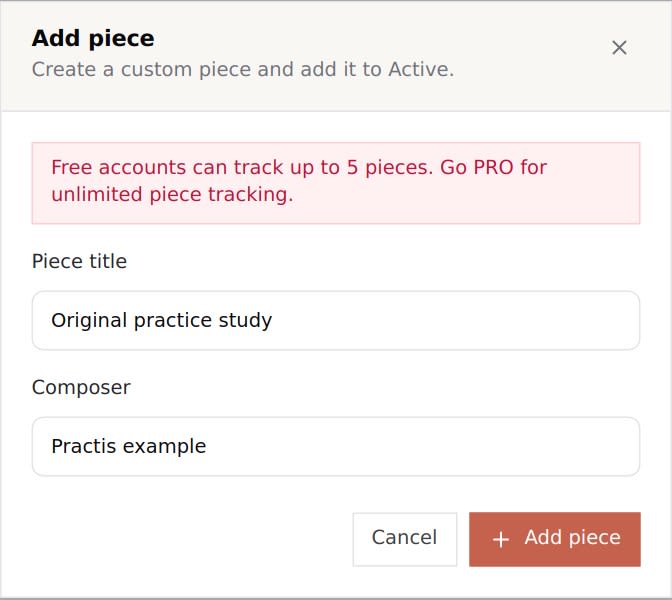
The standard Free collection limit is five pieces across library and custom entries together. A custom piece does not create a separate free allowance. Changing a piece's status to archived or learned also does not, by itself, remove it from the counted collection. Some older Free accounts have a legacy allowance; use the limit shown by your own account rather than assuming a new account will match an older one.
Here is the actual add-piece limit message, shown with an example entry. The practical boundary is reached when the account tries to add another item after the allowance is used.
For the nine-piece recital-and-maintenance example, Pro has a clear job: keep the repertoire together without continually deciding which piece must leave the collection. The benefit is continuity across preparation, older work and new reading. Paying for more room does not require turning every piece into a daily obligation.
If you genuinely work on only two or three pieces at a time and keep your long-term catalogue somewhere else, that benefit may be less important. But do not delete repertoire or its associated material casually to make an upgrade decision. Check the specific removal warning, retain any files you need and avoid treating a deletion as an archive button.
“Unlimited pieces” should also be read precisely. It removes the normal Pro repertoire-count restriction; it does not make uploaded PDFs, audio and video consume zero storage. Those files still share a finite media allowance. A large list of titles and a large set of scanned books create different demands on the account.
Week three: frequent recordings and a growing score library
A recording-heavy week changes the decision even with a small repertoire. Suppose a player wants a short audio take after most sessions, a video of a complete run-through and several uploaded scores ready to open. The first question is whether the video itself matters. If they only need to hear the result, Free's audio recording may already answer it.
Audio recording is available to signed-in Free users. Video recording is a paid-plan feature. Pro also raises the shared media pool from Free's 100 MB to 3 GB. The pool covers scores and recordings together; it is not 100 MB for each category. The app's MB/GB labels use binary units internally.
The example below illustrates a Free account with room remaining, but not enough for its next planned file. These are chosen file sizes to make the arithmetic visible, not measured averages or promises about recording length.
- Uploaded scores
- 30 MB
- Saved audio takes
- 50 MB
- Used together
- 80 MB
- Free allowance remaining
- 20 MB
30 MB scores + 50 MB audio + 20 MB remaining = 100 MB. A new 25 MB file would exceed this allowance by 5 MB.
Keeping one useful reference take per piece can be manageable. Keeping every trial, several camera angles and complete performances builds a different archive. Check your actual storage usage before a session that must produce a saved recording, especially when you have recently uploaded large scanned PDFs.
There are two reasonable responses to the example. You can retain copies of files you need outside the app and remove only material you no longer want there, after checking what the removal does. Or you can use Pro's larger pool when the ongoing archive is valuable. Downloading or copying a file does not itself free account storage, and an export should be checked before its original is removed.
Pro's capacity is still finite. Uploads also have file-size and supported-format limits; a 3 GB pool is not permission to send a single file of any size. Avoid planning storage in a fixed number of minutes. Audio format, camera settings, image resolution and compression can change the result substantially.
The recording decision should start with what you will review. Video can help you see a movement or positioning question to discuss with a teacher. It also creates larger files and more material to sort. Our post on recording your practice covers how to make listening back useful; paying for video does not make every session need a camera.
Cue's seven-day window is separate from the Pro billing offer
A Free account's Cue access runs for seven days from signup. The window does not wait until the first time you open Cue, and it is not an allowance of seven sessions. A reader who signs up and returns much later should not expect an unused week to begin then.
Pro provides ongoing Cue access rather than that Free-account countdown. Cue is most relevant when you practise with a score and want passage-level context for returning to the work. It is not a replacement for an ordinary session log, and it does not turn the plan into a note-correctness grading service.
The preparation view below shows the kind of task to try during the window: choose a passage and make the session's focus clear. The full Cue walkthrough explains supported score preparation, microphone use and how to read the resulting practice record.
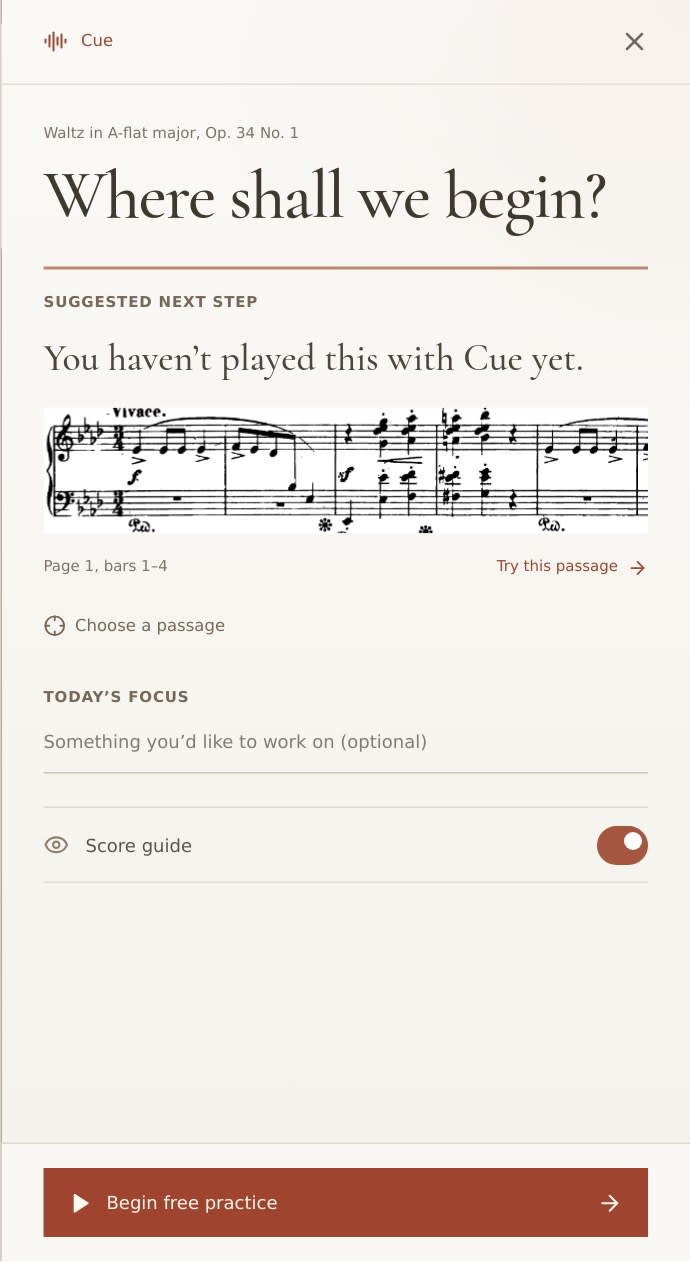
Use that week on music you already intend to practise. Choose a short familiar section, check that the score is readable and give yourself time to inspect the review. The decision is whether the result helps you return to useful work. You do not need to fill the trial with extra sessions just to demonstrate that you have used it.
When the Free Cue window ends, its preparation panel offers the Pro route instead of a new Cue session. That is a limit on Cue, not an announcement that the entire Free diary has expired. If ordinary logging, your current collection and audio storage are sufficient, remaining on Free is still a valid choice.
The website's first-month-free Pro offer belongs to billing. It should not be confused with the seven-day Cue window attached to a Free account. Before accepting any subscription offer, check the amount due now, its renewal date and the recurring amount shown at checkout.
Monthly or annual: compare the actual commitment
The current website pricing offers monthly and annual Pro. These figures are USD plan prices checked on 28 September 2026; checkout determines applicable taxes and final terms. App-store purchases may have different prices, offers or management routes, so compare the screen for the channel you are actually using.
Free
No individual subscription charge; the account limits above apply.
Monthly Pro
Currently advertised with the first month free, then monthly renewal. Confirm eligibility and terms at checkout.
Annual Pro
One annual charge. Approximately $3.33 per month as a comparison, not monthly billing.
At the standard recurring rate, twelve paid monthly periods total $59.88. Annual Pro is $19.89 less than that baseline. If the advertised first free month applies, an illustrative first twelve monthly periods contain eleven payments, totalling $54.89 before any applicable tax. Annual pricing does not automatically inherit the monthly free-first-month offer.
The shorter commitment can matter more than the annual discount. Three paid monthly periods cost $14.97. If you only need Pro for a short preparation block, buying an entire year would spend more upfront. Conversely, a musician already using the larger repertoire and recording features throughout the year has a clearer reason to consider annual billing.
Use your expected period of use, not just the monthly-equivalent headline. Also check where you subscribed before managing renewal: a purchase made through an app store should not be assumed to behave like a website subscription. Keep the purchase confirmation and follow the management route supplied with it.
Individual Pro and teacher tools answer different needs
A student or independent musician choosing between Free and Pro is deciding how to manage their own practice. A teacher buying tools for a studio is also deciding how to work with students, assignments and their preparation. An individual Pro upgrade should not be assumed to provide a particular teacher roster size or an institution workspace.
If your main task is seeing what happened between other people's lessons, inspect the current teacher offering separately. For a music school or department, check the institution workflow and its terms. The individual media and collection examples in this post do not establish a school-wide plan, shared billing arrangement or administrative permission.
A short check before changing plans
Look at one ordinary week rather than an idealised version of how much you hope to practise. These checks make the decision specific:
- Count the repertoire you want to keep in the account, including custom and previously learned pieces.
- Check the storage already occupied by scores and recordings, then consider the files you expect to add.
- Decide whether you need video or whether a short audio take answers the question.
- If Cue matters, check your access window and try a real practice task before relying on it.
- Read the chosen billing channel's amount due, renewal timing and management instructions.
Stay on Free when it already supports the work. For the nine-piece repertoire example, the reason for Pro is continuity across a larger collection. For the recording-heavy example, it is video or capacity. For a regular Cue user, it is continued access. Choose the commitment that matches the feature you will actually return to.