

A music habit tracker can tell you whether practice happened. It may also keep minutes, reminders and notes. The choice gets more interesting when you want to find what happened in a particular piece, especially after several short sessions on the same day.
Keep a general habit tracker when your main question is attendance or a daily total. A piece-linked practice app becomes more useful when you regularly return to passage notes, separate sessions and recordings. The difference is how you organise and retrieve the information, rather than whether an app has a timer.
Below, we compare our own app, Practis, with the documented features of Streaks and Loop, then work through five example sessions. The downloadable worksheet helps you check your existing setup before moving anything.
First decide what one entry represents
A task called “Practise piano” can represent a whole day. You complete it once, perhaps enter 30 minutes, and add a note about the music. That is a reasonable record if you want to know whether you made time to play.
A practice session is a smaller unit. You might work on a waltz before breakfast and a study after dinner. Keeping separate entries preserves which piece received which minutes and gives each attempt its own note. Counting those entries as days would overstate your attendance; adding them together for a daily total is entirely sensible.
General habit tools can hold more than a checkmark. You can create a task for each piece or write several labelled lines inside a daily note. The question is whether you want to maintain that arrangement, and whether it gives you the view you need when you sit down again.
Practis, Streaks and Loop organise the job differently
Practis: keep the session attached to its piece
Practis is our product. Its relevant advantage here is a music-specific record: sessions have a piece, duration and notes, while recordings can be organised by piece in their own view. You do not have to invent a naming system that makes “Piano” mean three different compositions.
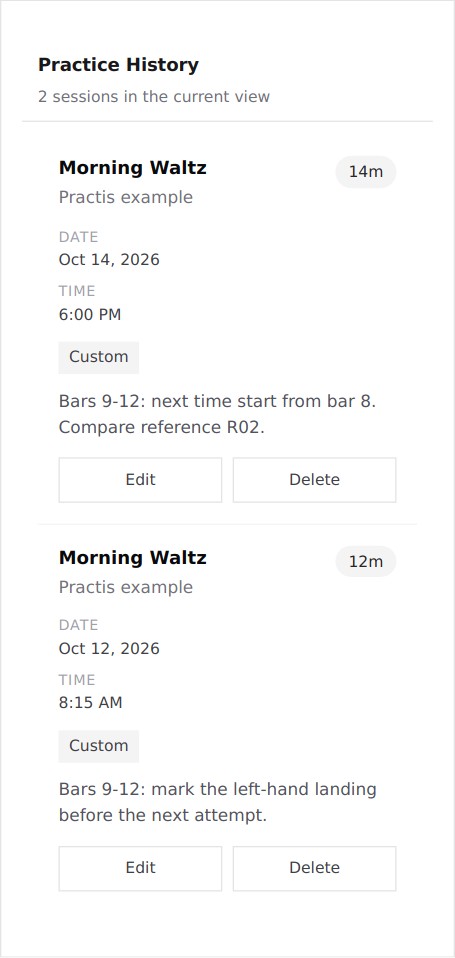
In the example below, searching History for Morning Waltz returns its two sessions with their separate durations and notes. The later note says to begin at bar 8 and refers to recording R02. The recordings view can then be filtered to the same piece. This is useful when the question before playing is “Where did we leave this?”
It still requires input. A useful passage note has to be written, the correct piece selected and a recording identified clearly. A duration does not assess the quality of an attempt. We also use an explicit R02 reference in this example: the session note and recording are separate records, not an automatically linked pair.
If you only want a reminder alongside exercise, reading and other daily habits, a separate music workspace may be more organisation than you need. For comparisons with other music-specific tools, see our practice-tracker app guide; this post concentrates on the choice between habit and repertoire records.
Streaks: a scheduled task can carry useful context
Streaks combines scheduled tasks with timers and reminders across supported Apple devices. You can set the days a task is expected or a weekly frequency; its documented schedule accommodates days off. That is a good starting point for “Practise three days this week” without treating every blank calendar day as a failure.
Its notes feature supports both a dated note and a pinned note for a task. A pinned note could hold a regular warm-up instruction, while the dated note records today's pieces. For a short repertoire list, that may cover everything you need.
The distinction becomes clearer in its documented CSV export: a row represents a day of a task, with completion, missed or skipped status and possible partial completions. That is not automatically the same structure as one row for each separate musical session. A note can still describe both attempts; you would need a consistent convention to extract their individual minutes later.
Creating a separate Streaks task for each piece is another reasonable arrangement. Think through whether each piece really has a daily target, how you will name movements, and what you want the calendar to show when your repertoire changes. Those choices are manageable, but they become part of maintaining the log.
Loop: a free Android option for a local habit record
Loop Habit Tracker is free and open source. Its official Android listing documents flexible schedules, reminders, offline use without an account, and CSV or SQLite exports. That is a strong fit when a local record and a weekly target are the priorities.
Loop also supports measurable habits and dated notes; its release history documents these additions, including notes in CSV exports from version 2.3.1. A numerical practice total therefore need not be reduced to a yes/no mark. Entering a quantity is distinct from assuming the app automatically times or listens to a musical session.
As with Streaks, the meaning of a habit is yours to define. A single piano habit keeps the overview compact. Separate habits for pieces provide more separation but ask you to maintain more entries. Neither structure can recover a passage detail that you never wrote down.
Loop's habit score concerns repeated completion. It is not a rating of playing, tone or progress through a score. Keep that distinction when deciding which chart you actually want to consult.
A four-day example: five sessions are three practice days
The following fictional record uses three pieces: Morning Waltz, River Study and a D-major scale pattern. Monday and Wednesday each contain two sessions. Tuesday is a planned rest day. These are example records, not a student's results.
The calendar view answers an attendance question without losing the distinction between a rest day and a day on which practice was intended.
Open those daily totals and the allocation looks different. The session table keeps the two Monday pieces separate instead of assigning all 30 minutes to whichever title appears first in a note.
| Session | Date and start | Piece | Duration |
|---|---|---|---|
| S01 | 12 Oct, 08:15 | Morning Waltz | 12 min |
| S02 | 12 Oct, 18:30 | River Study | 18 min |
| S03 | 14 Oct, 18:00 | Morning Waltz | 14 min |
| S04 | 14 Oct, 18:20 | D major scale pattern | 9 min |
| S05 | 15 Oct, 19:00 | River Study | 17 min |
The example yields 26 minutes for Morning Waltz, 35 for River Study and nine for the scale pattern. A daily-total tracker can still store this information in a note. It simply needs the breakdown somewhere if you want to answer the piece question later.
Four questions to ask of your own log
1. How many days did practice happen?
Count distinct dates with practice, rather than session rows. In our example the answer is three. A habit calendar is well suited to this question, provided its target represents days rather than a number of repetitions.
Also decide what a blank means. Tuesday here was deliberately free; an empty cell alone would not tell a reader that. Configure the schedule where the tool supports it, or keep the planned days alongside the record. Our post on practice streaks and pressure considers the motivational side; the software choice here is about preserving the meaning of the dates.
2. How much time went to this piece?
For Morning Waltz, the calculation is 12 plus 14 minutes. Those minutes are identifiable because both entries use the same piece. A generic “Music, 70 minutes” total cannot supply that breakdown on its own.
If you use one habit task per piece, it can provide a similar separation. Avoid switching between a nickname, an opus number and “today's piece” unless you are happy to reconcile them later. With a single daily note, a compact convention such as Morning Waltz: 12 min; River Study: 18 min is enough to preserve Monday's split for manual review.
3. Where should the next attempt begin?
The latest Waltz entry says: “Bars 9-12: next time start from bar 8. Compare reference R02.” This contains an action and a location. “Good practice” would give you much less to work with, regardless of which app stored it.
Here is that note in Practis History, using the example records. The two Waltz sessions remain individually visible. Searching for the piece retrieves both; searching for R02 retrieves the later note.
In a general habit tracker, the same sentence can live in a dated note. Try retrieving it after several newer entries have accumulated. If that is easy enough for you, there is no requirement to move it into another app merely because the subject is music.
4. Which recording should be compared?
“Listen to Wednesday's recording” becomes ambiguous when Wednesday contains several takes or pieces. The reference R02 gives the note a specific target. In our Practis example, filtering the separate recordings view to Morning Waltz isolates the corresponding entry.
You can use a similar convention with a phone recorder or a folder of files: include a stable piece name, date, passage and take reference in the filename or title. A habit note can then name that reference. This is a workable no-new-app option, although you remain responsible for keeping the note and file names aligned.
The downloadable example includes the R02 reference but no audio file. It demonstrates organisation, not a before-and-after playing assessment.
Devices, accounts and the cost of trying this
These options assume you already own a compatible device and an instrument. No microphone, MIDI adapter or additional hardware is required for the written logging example. Prices were checked on 16 October 2026; the Streaks quote is from the US App Store and Practis prices are in US dollars. Check local currency and any applicable tax at checkout.
| Option | Platform | Cost for this comparison | Access detail |
|---|---|---|---|
| Practis | Web; iOS/iPadOS and Android apps | Free account for the three-piece example | New Free accounts have a five-piece collection limit. Recordings and score uploads share storage. |
| Streaks | Supported Apple devices | $5.99 once | No recurring subscription; confirm the device's OS compatibility before purchase. |
| Loop | Android | Free | No account required; local offline use. |
Practis Free includes audio recording within a shared 100 MiB allowance for uploaded scores and recordings. Free does not include video recording. Pro raises media storage to 3 GiB and removes the ordinary five-piece collection cap. The current web plans list Pro at $4.99 monthly or $39.99 annually, but the history-and-notes example above does not require that subscription.
Streaks' US listing supplies the current device requirements and price; its support page confirms the one-time purchase. Loop's free distribution is linked from its official site above. Use those links rather than assuming a similarly named store app is the same product.
For a wider cost comparison between music-specific trackers, our free, one-time and subscription tracker post covers that separate decision. Paying for more features is unnecessary when your existing tool already preserves the information you need.
Try the retrieval questions before changing tools
Use a few days of your own practice, or the fictional records above. You do not need to transfer your whole history to find out whether a different structure helps.
- Write the question first. Attendance, total minutes, a passage reminder and a particular take are four different requests. Cross out the ones you do not need.
- Find the answer in your current tool. Note any searching, adding or opening of another app involved. A small amount of manual work may be perfectly acceptable.
- Check what you would have to enter next time. A separate piece task, a longer daily note and a dedicated session record each ask something different of you.
- Try one alternative only if an important answer is missing. Keep the old records until you have checked what the new tool can actually retain and export.
The worksheet has room for those decisions. The session CSV supplies the exact worked example, including notes; it is a plain illustrative table, not an app import file or a tested competitor export.
A useful result might be as small as adding piece names to the notes you already keep. It might also be discovering that you want a separate history for each piece. Let the questions you repeatedly ask of your practice decide how much structure to add.


