A piano MIDI file can open in a notation editor and still produce a score that is awkward to play from. The pitches may be there, while the melody jumps between staves and a slightly late note becomes an unexpected rest. The useful route is to tidy the rhythm in a copy of the MIDI, then decide how the music belongs on the page.
Featured photo: Kaboompics / Pexels. Score examples below are original Practis music.
Start with a MIDI file and a desktop notation editor
We used MuseScore Studio 4.7.6 on Linux, available from the free desktop download. Local MIDI import and PDF export do not require a MuseScore.com subscription. You need to recognise the intended pitches and rhythms; the software cannot decide whether your hesitation was expressive timing or a written rest.
Your input should end in .mid or .midi. A WAV or MP3 contains recorded sound and needs a separate audio-to-notation process first. If your piano or recording program offers both audio and MIDI export, choose MIDI for this job and keep the audio as a listening reference.
For timing cleanup on your own file, use a MIDI editor that can quantise note starts and ends, or correct the rhythms directly in the score. The sample pack includes the already-quantised MIDI, so you can follow the notation repair with MuseScore alone.
Our example is a four-bar phrase in C major, in 4/4 at 80 beats per minute. We generated its MIDI with deliberately uneven note starts and releases; it is not a pianist’s recorded performance. It includes a melody, a simple bass line and one held inner note, all mixed into a single piano track.
Download the complete example ZIP
Includes the original MIDI, three editable MuseScore scores, before-and-after PDFs, MusicXML and the scripts used to reproduce the conversion. You can inspect the scores without running any scripts.
Open the file, then look for the musical problem
Choose File → Open and select the MIDI file. MuseScore supports MIDI through its ordinary file-opening command. Save the result as a new MuseScore project so you have an untouched first import to compare with later.
Here is what the default import produced from our short phrase. It contains five bars, although the intended music lasts four. There are extra rests, abrupt clef changes and melody notes stranded on the lower staff.
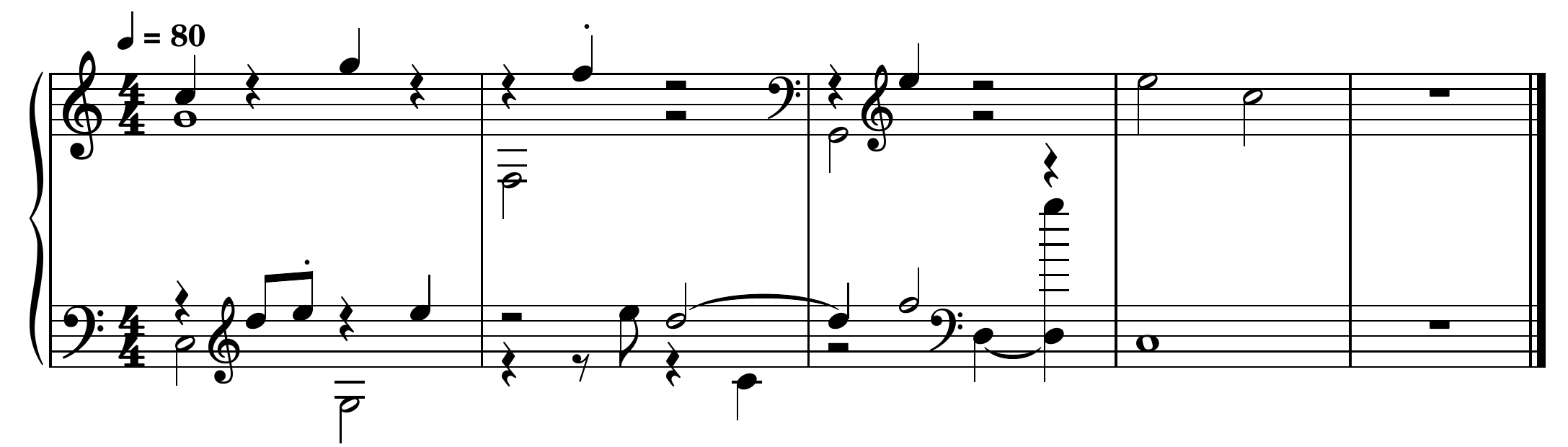
Begin with the time signature, the position of the first beat and the melody’s rhythm. If those are wrong throughout the piece, fixing individual rests now creates a lot of work that another import may undo. For a file that drifts away from the barlines, return to the recording program and check its tempo map and starting position.
A freely timed introduction needs particular care. Forcing it onto one fixed grid may move entire gestures to the wrong beat. It can be quicker to notate that short section by hand, using the recording as a reference, and import a steadier section separately.
Choose the rhythm you intended to write
Quantisation moves note times onto a rhythmic grid. Our phrase uses eighth notes as its smallest written value, so we rounded note starts and releases to the nearest eighth before importing again. That removes the deliberately small timing deviations while preserving the intended rhythm.
Use a copy of your file. In a MIDI editor, check whether its quantise command changes note starts, note ends or both. Correct starts with untidy releases can still produce little gaps, overlaps and odd-looking durations. Export the edited copy as a new MIDI file, then open that file in MuseScore.
An eighth-note grid is right for this example. It would erase genuine sixteenths, and straight eighths would misrepresent a triplet passage. Choose from what the music actually contains; do not apply the same setting to every recording. Keep the expressive original for playback, because a score-friendly copy may sound much more even.
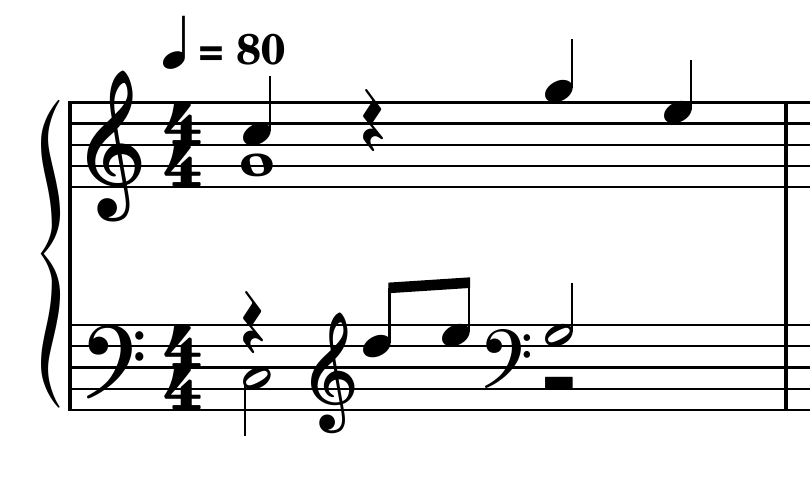
The second import now has four bars and all the intended note times. But look at its first bar: the two eighth notes on beat 2 are still on the bass staff, with a temporary treble clef. Timing cleanup has not identified the right hand.
How to reproduce our exact conversion
The example was processed with MuseScore’s command-line converter and the Python scripts in the ZIP. Its README gives the commands and dependencies. prepare-midi.py rounds this sample’s note starts and ends; repair-score.py edits the resulting MusicXML. The repair script is specific to these four bars, so it is not an automatic converter for other pieces.
Put the melody, bass and held notes where they belong
Read each musical line on its own. In bar 1, our right-hand melody is C5, D5, E5, G5, E5; D and E are the two eighths. A separate G4 stays down for the whole bar. The left hand plays C3 followed by G3, both half notes. Here, C4 means middle C.
That held G4 needs a second voice on the upper staff, because its duration is independent of the moving melody. A voice is a rhythmic line within a staff, rather than another instrument or another hand. MuseScore’s multiple-voice tools let the melody use voice 1 while the held note uses voice 2.
For a few misplaced notes, re-entering the correct passage can be clearer than preserving every choice the importer made. In a working copy, select the intended position on the upper staff, enter note-input mode with N, choose voice 1 and the required duration, then enter the pitch. Check its octave. MuseScore’s note-entry instructions cover selecting a position and replacing existing notes or rests.
Remove the old misplaced note after its replacement is correct, so playback does not double it. Rebuild the bass rhythm in one voice where those notes belong together. Avoid hiding the resulting rests as a cosmetic fix: a rest may be revealing an unnecessary voice that should be removed or consolidated.
In our repaired import, three melody notes move to the upper staff: D5 and E5 in bar 1, and E5 on beat 2 of bar 3. Two bass notes are consolidated into the main bass voice. We also remove the redundant clef changes. None of those edits changes a pitch or its length.
Check the notes that continue across a beat or barline
The D5 that begins on beat 3 of bar 2 lasts three beats. On the page it is a half note tied to a quarter note in bar 3. That tie means hold the same note across the barline; playing the second note again would change the phrase. A slur has a different purpose, as the slur and tie guide explains.
Elsewhere, distinguish a real break in the phrase from a tiny gap caused by releasing a key before the next attack. Lengthening every note can destroy intentional articulation just as easily as leaving every gap can make the score unreadable. Check suspicious places against your original take and the musical line.
Pedal needs its own decision. Our raw file contains sustain-pedal events, and the quantised MIDI retains them. The finished practice score deliberately leaves out pedal markings so the written note lengths are clear; it does not preserve the original pedal playback. For your own piece, decide which pedal changes another player actually needs and add them using the pedal notation tools. A held pedal is not a reason to write every ringing note as a long finger-held note.
Export a score you can read at the piano
The finished phrase fits on two ordinary piano staves. The melody stays together, the held G has its own duration, and the D ties correctly into bar 3.
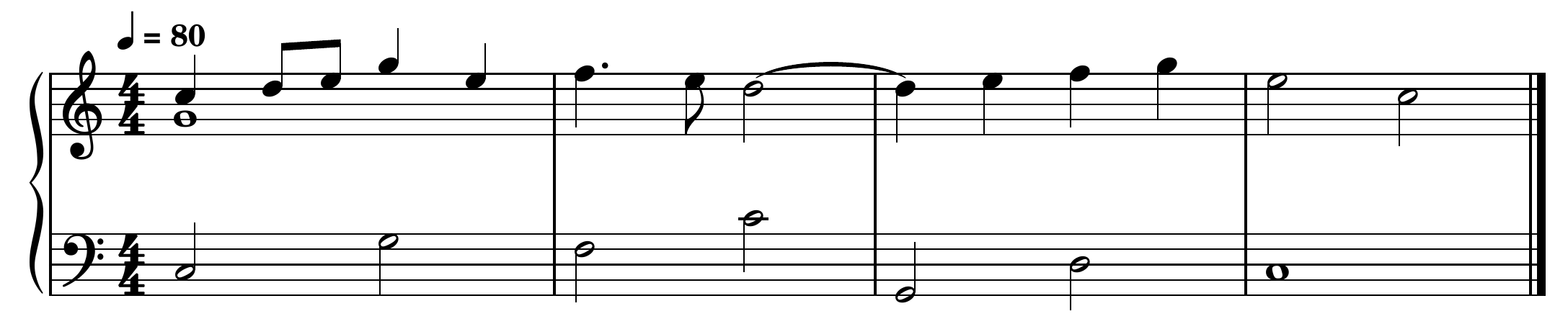
Play the melody alone, then add the bass and the held inner note. Listen through the notation playback too, comparing any uncertain rhythm with your original recording. In this phrase, check that the D continues across the barline without a second attack and that the two eighths in bar 1 stay evenly spaced.
Save the editable MSCZ project. Then use File → Export to make a PDF for reading and a MusicXML file if you want to continue editing elsewhere. These are separate jobs: the PDF preserves the page, while MusicXML carries notation that another editor may lay out differently. See the export options.
Open the exported PDF before taking it to the instrument. Check the first and last bars, the tie and the smallest note values at the size you will actually read. For a longer piece, our practice-score layout guide covers staff size and useful line breaks once the notes are settled.
Keep the original MIDI beside the final score. If you later wonder why a rhythm was simplified, it gives you the performance detail that the readable page was never meant to preserve exactly.