If your school uses My Music Staff, adding Practis should begin with a teaching problem you can name. A second login is a poor purchase when the first system already does what your students and teachers need.
My Music Staff already has practice logging and repertoire tools. Use them if they cover your weekly teaching. Practis becomes worth considering when staff need to see how a student's pieces, forthcoming programme and unresolved concerns fit together across a department. Running both makes sense only if that shared view is worth maintaining.
Practis is our product. We compared its current institution features with My Music Staff's published documentation; we have not run a hands-on My Music Staff trial for this comparison.
Start with the teaching tools you already have
Describing My Music Staff as billing software with a calendar leaves out a substantial part of the product. Its Student Portal lets students log practice manually or with a timer, add notes and questions, and upload files such as a practice video. That can support the ordinary exchange between lessons: a student records what happened; the teacher has something specific to respond to.
Its learning-management tools include a repertoire library, assigning pieces while taking attendance, tracking progress and sharing audio, video or sheet music. A school does not need Practis simply to give a student a piece and collect a practice note.
There is a useful real example in Music Academy Midlands’ guide for families. It explains how students find current and completed repertoire, read their teacher's practice notes and access learning resources. The practical appeal is having familiar lesson information in the place families already visit.
Nor does employing several teachers automatically create a need to move. My Music Staff supports individual staff accounts and configurable permissions, with teachers managing their own schedules, attendance and notes. Before buying another system for collaboration, see whether a better use of those existing accounts would solve the problem.
A teacher who wants a weekly practice record, a short video and a reliable place to leave homework has a good reason to keep the arrangement simple. The same applies to a small school where the person teaching each student is also the person reviewing their progress and organising the occasional performance.
What an additional staff workspace can change
A different problem appears when several people need to act on the same musical situation. The piano teacher knows which passage is fragile. A department head needs to know whether the student's jury programme is complete. Another member of staff needs to see who is arranging help. Those are related questions, but a practice total answers none of them on its own.
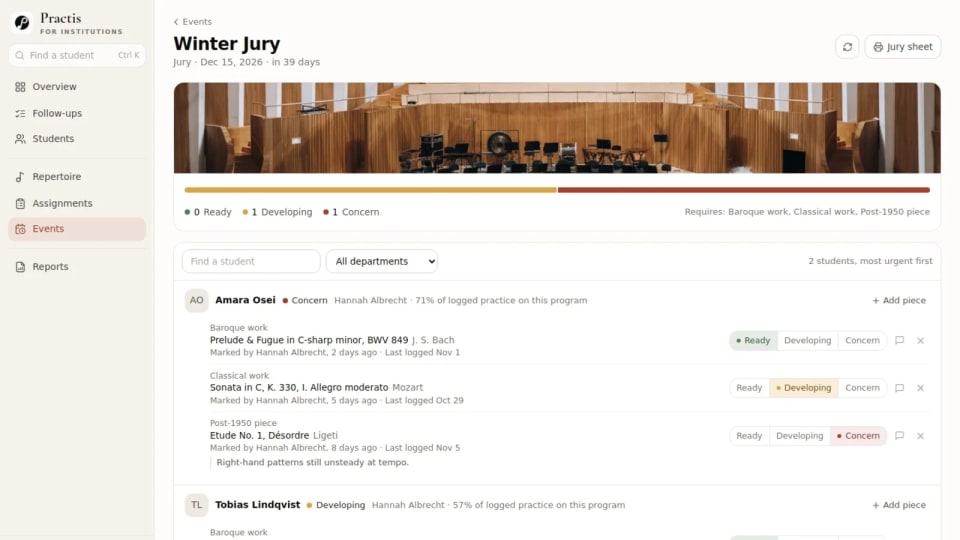
Practis brings a student's programmes, repertoire, recorded practice, assignments, lesson dates and follow-ups into the institution workspace. Event programmes can have required slots, proposed pieces and staff approval. Teachers assess pieces as Ready, Developing, Concern or Not reviewed; the event view also draws attention to incomplete requirements. The musical judgement remains the teacher's.
For staff, the useful question is whether that context changes a conversation. Can the department head find the current programme without requesting another list? Can the teacher see which concern still needs attention? Can the next person tell who agreed to act? If your present arrangement already answers these clearly, an additional dashboard offers little.
Access also needs to match the job. In Practis, administrators see the institution, department heads have read access within their department, and teachers see their rostered students. A department head who needs to edit every teacher's programme should raise that requirement before buying: the department-head role is read-only.
My Music Staff's public pages do not establish whether your configured account can reproduce this exact programme-and-follow-up view. Ask to see the same situation in both products. A feature called “progress” or “permissions” is too broad to settle the decision.
One concern, two systems
The following Practis screen shows an illustrative piano student, Amara, preparing Ligeti's Étude No. 1, Désordre for a winter jury. Her piece has a Concern verdict. The follow-up names Hannah as its owner, shows In review and records an extra lesson on the opening as the next step.
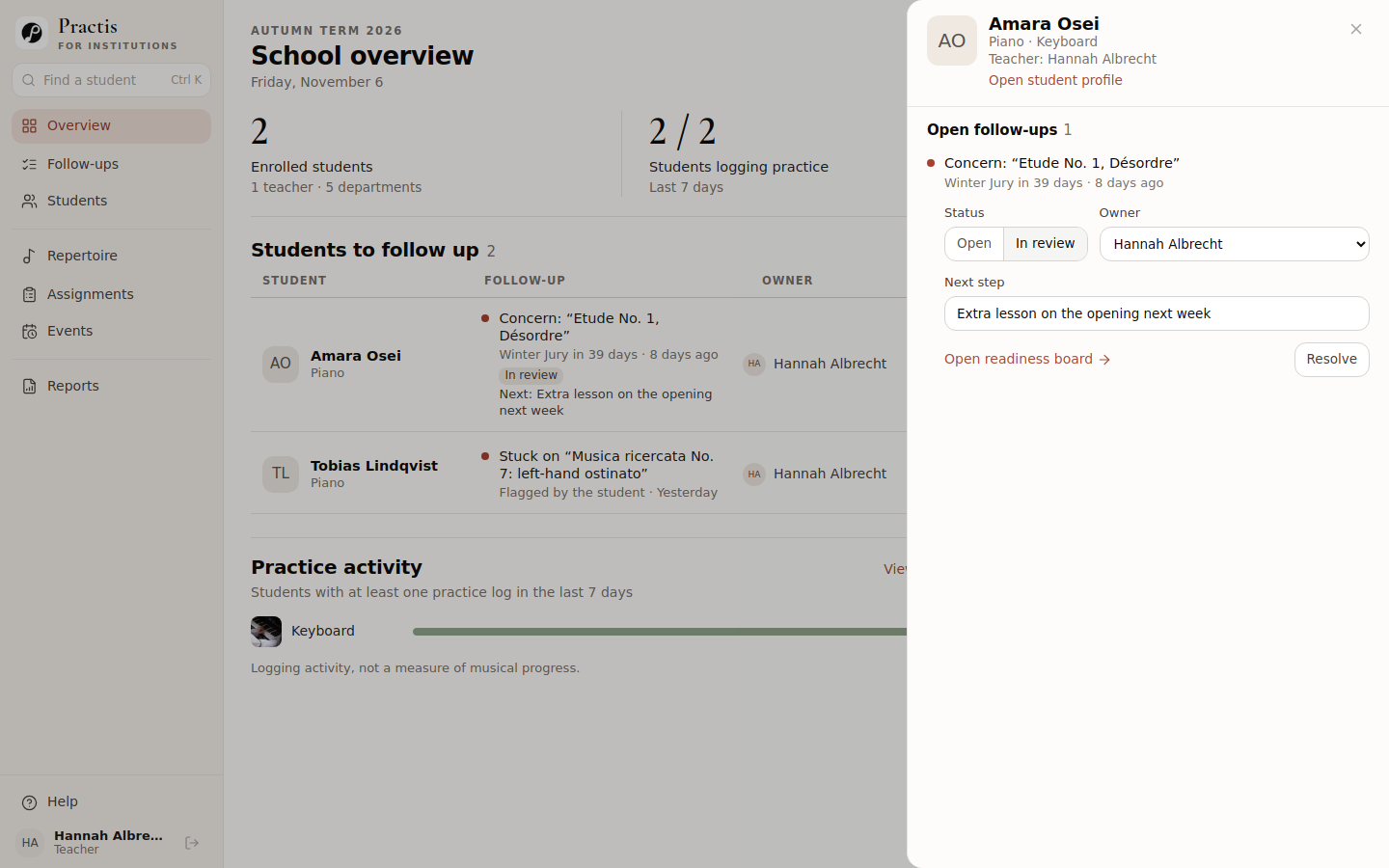
That is a specific teaching responsibility. It is also only one part of arranging the help. If a school uses My Music Staff for its timetable, the actual lesson still belongs on that lesson calendar, with the agreed time and attendance handled there. Writing “extra lesson” in Practis does not book an appointment or tell the family when to arrive.
After the lesson, the teacher has two different decisions to make. Has the agreed action been completed? Has the playing improved enough to change the piece's readiness verdict? Resolving a follow-up does not automatically make the piece Ready. An extra lesson can take place while the musical concern remains.
There is another boundary worth knowing: Practis follow-ups arise from issues already recorded in Practis, such as a programme piece marked Concern. Staff can give those issues an owner, next step and status. This is not a general task list into which any My Music Staff note automatically appears.
What the school gains: the programme concern, the responsible teacher and the next action remain connected.
What the school still does: arrange the lesson, communicate with the student, assess the playing and update the relevant records. Buying a second system does not remove those decisions.
For a school managing several programmes and shared responsibilities, that connection can be worth paying for. For a teacher managing one concern privately, a clear lesson note and the next appointment may be sufficient.
Ask to see Practis with your school's teaching process. Bring one programme, one unresolved concern and the roles of the people who need to act on it.
Decide which record lives where
Consider a fictional school with five teachers, including its owner, and one office administrator. Most students take weekly lessons; a smaller advanced cohort prepares formal programmes. The school keeps My Music Staff for its established office and family routines and considers Practis for that cohort's programme preparation.
This could be a sensible division of work. It becomes confusing if everyone is expected to maintain a complete duplicate of every record. Agree which version a colleague should trust before introducing the second system.
| Record | Main home | Who keeps it useful |
|---|---|---|
| Enrolment and family contact changes | My Music Staff | The office checks any affected Practis membership separately. |
| Lesson times, attendance and tuition | My Music Staff | The office and teacher use the existing booking and billing process. |
| Weekly instructions for the family | The established family channel | The teacher identifies the current instructions; no competing homework lists. |
| The student's practice diary | Choose one | The teacher and student agree where to record sessions and review them. |
| Event programme and piece verdicts | Practis, for the selected cohort | The programme's authorised staff keep pieces, approval and verdicts current. |
| Practis-generated concerns | Practis follow-ups | The named owner updates the action and checks the underlying issue. |
| The report sent to a family | One reviewed final document | The teacher checks relevant records and sends it through the agreed channel. |
Download the editable responsibility map (CSV). Open it in your spreadsheet app and replace the suggested owners with actual roles in your school.
The practice-diary row deserves particular care. Requiring students to type the same session into two apps makes the school's record-keeping their problem. Choose a normal home for their practice. If they keep logging in My Music Staff, Practis's practice figures will not include those sessions. A quiet Practis record then says very little about how much they practised.
The reverse choice has a consequence too. If the advanced cohort moves its practice diary to Practis, families need to know where those records now live and what will still arrive through the school's usual channel. Do not promise a combined family portal or automatic copying of the diary.
For final reporting, bring together the evidence that is useful to the reader rather than attaching every available export. Our music student progress report examples show how a teacher can turn records into a clear account of what changed and what comes next.
The awkward moment is when something changes
Two systems can look tidy on the day they are set up. Their usefulness becomes clearer when the student's plans change.
Suppose Amara replaces one jury piece. The teacher updates the programme in Practis, then checks whether the family-facing instructions still ask her to prepare the old work. A second copy of the entire programme is unnecessary unless someone needs it; an obsolete instruction is a real problem. The person approving the change should know who must be told.
A teacher change needs a similar check. Updating the timetable is one action. Checking the student's Practis roster, access and unresolved follow-up ownership is another. The incoming teacher should receive the relevant musical context, while the former teacher's access should reflect their new responsibilities.
When a student leaves, give someone responsibility for reviewing their status and access in both places under the school's own retention arrangements. Ending lessons in one product should not be assumed to change the other.
Plan to maintain the two systems separately. We found no Practis connection in My Music Staff's published integration directory. Budget for separate administration unless both suppliers confirm the exact transfer you need and demonstrate it.
Price the extra work as well as the extra subscription
My Music Staff's published US subscription is US$16.95 a month for the first teacher or staff account, plus US$4.95 for each additional one, with unlimited students. Our fictional school's five teachers and one administrator therefore make six accounts: US$41.70 a month. The owner is included among the five teachers, not added again.
Prices checked 7 November 2026. This is the US monthly subscription subtotal; confirm applicable tax and any payment-processing charges for your account. Other countries have their own published rates.
The same pricing page includes the learning tools and advertises a 30-day trial. There is no need to buy a second product just to discover whether My Music Staff's practice log suits your students.
For Practis, obtain an institution quote for the students, staff and departments you intend to include, with any setup or support charges and the contract period clearly stated. An individual practice-app subscription is not a substitute for a school quote. Without that quote, there is no honest combined monthly total to print here.
The less visible cost is staff attention. In the example above, someone checks changed programmes against family instructions, maintains the relevant access in two places and makes sure follow-up ownership remains current. During a demonstration, have the people who will do those jobs perform them. Record where they need to re-enter information. That is part of the purchase price even if it never appears on an invoice.
The decision your school needs to make
Keep My Music Staff on its own when the existing lesson notes, repertoire and practice record give the right people enough context, and the remaining coordination is manageable. A second product is unlikely to help if the real difficulty is that staff have no agreed time to review students' work.
Consider adding Practis when a programme, a concern or a shared teaching responsibility repeatedly falls between people, and the institution view makes that work easier to understand and carry forward. Be specific about the cohort using it and the records someone will maintain.
If your central problem is family billing, class transfers or teacher cover, the more relevant comparison is My Music Staff versus Jackrabbit Music. If it is jury scheduling or returned adjudicator feedback, our music jury software comparison separates those jobs from programme preparation.
For this purchase, take the changed-piece example to the demonstration. Ask the teacher and the office administrator to explain what each of them updates and what the student sees next. Their answer will tell you whether two systems form a workable arrangement for your school.
Featured image: Ladson Oliveira / Pexels.