
A student changes a movement two days before the jury. Their teacher knows, the pianist has the old version, and the panel’s sheet still lists the original programme. A calendar full of neatly booked appointments will not resolve that disagreement.
Choosing music jury software starts with deciding which part of the process needs help. Practis fits preparation and faculty follow-up; The Jury-System fits the administration of the assessment event; a well-managed form and spreadsheet can still serve a small, straightforward jury. Some schools need two of those approaches, with a clear agreement about which record is authoritative.
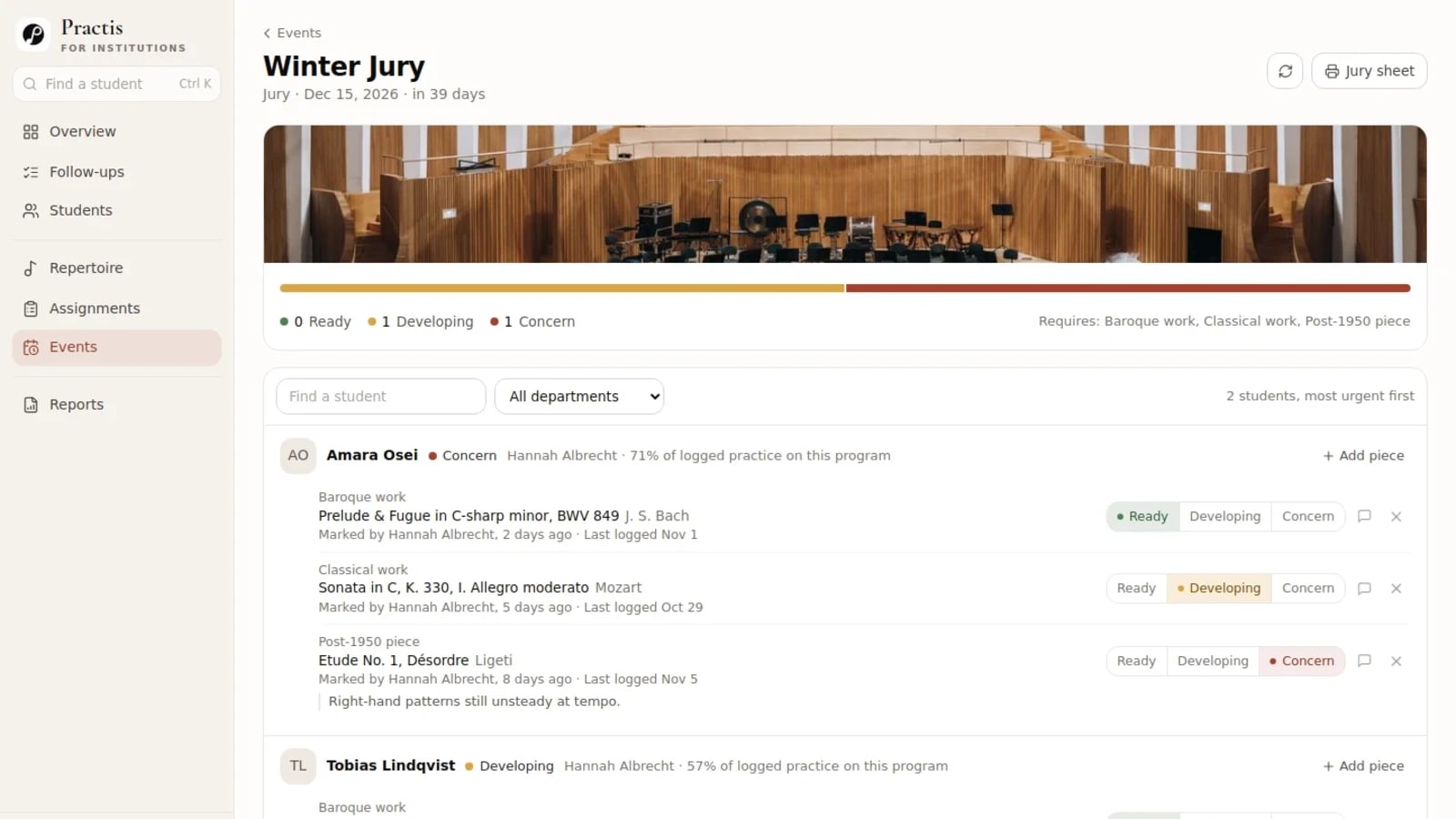
Featured image: the Practis jury-preparation board, captured 6 November 2026. Student records shown throughout this post are illustrative.
The three jobs hiding inside “jury software”
In a music jury, a student presents prepared work to faculty for assessment. The performance may be short, but the surrounding work spans weeks: choosing eligible repertoire, checking preparation, arranging a time and pianist, collecting individual evaluations, and deciding what follows.
These responsibilities are often divided even inside one institution. The University of North Texas instructions place information and forms in division or area Canvas courses, require a completed repertoire form with the time request, and include teacher certification. At Carnegie Mellon, studio areas determine repertoire and other requirements; committee members complete individual evaluations, with their relationship to the studio grade determined locally. Neither procedure can be reduced to “upload the pieces and pick a slot.”
Use the comparison below to identify the job you are buying. The Jury-System column reflects its published product description; we have not performed an independent account test of that service.
On a phone, swipe the table sideways to compare all three approaches.
| Job | Practis | The Jury-System | Forms + spreadsheet |
|---|---|---|---|
| Prepare the programme | Event requirements, repertoire, approval and teacher readiness alongside practice context. | Student-submitted repertoire records. | Define fields and maintain the agreed version yourself. |
| Allocate jury times | Keep a separate scheduling process. | Configured schedules and student signup. | Use your booking method or allocate times manually. |
| Collect panel marks | Keep official assessment elsewhere. | Custom evaluation forms and grades. | Separate panel forms; decide how results are consolidated. |
| Return evaluations | Arrange the official results process separately. | Email delivery to selected recipients. | Check and distribute the right record to each recipient. |
| Act on preparation concerns | Named follow-ups linked to student context. | Check any preparation workflow you require with the supplier. | Add an owner, action and review date to your register. |
| Carry a programme to the panel | Printable jury roster with programme and readiness context. | Repertoire beside the evaluation form. | Generate and check the panel’s final copy. |
There is an important difference between a programme being complete, a teacher considering it ready, and a panel awarding a result. Keep those meanings separate in any tool. A submitted title proves that a field has been filled in; a preparation label records a judgement before the performance; an assessment belongs to the performance and the institution’s rules.
Practis: see how the programme is coming together
Practis is our platform. Its most useful role here is giving faculty a shared view of the work leading up to the jury: what each student intends to play, which requirements those choices address, what the teacher has reviewed and which concern needs attention next.
The event board brings programmes together, while the student view opens the surrounding repertoire and practice record. A teacher can distinguish a piece that is ready from one that is developing or causing concern, and add the musical reason. Requirements and approvals also matter: near a deadline, an unfilled requirement or unapproved repertoire choice can keep a programme flagged even when some individual pieces have been marked ready.
The film below follows the actual workspace from a staff overview to a student programme, the jury board and a printable report. It is silent and lasts 75 seconds. The event board appears at about 0:44; the student report appears near 1:04.
Practice figures provide context for a conversation. They do not decide readiness. A substantial total may describe work on a difficult piece; a missing entry may mean the student did not log a session. The useful question remains musical: what did the teacher hear, what is still uncertain, and what will be checked next?
A follow-up can carry the concern to a named person and an agreed next action. The printable jury sheet carries student, teacher, programme, readiness and any recorded outcome context into the event. It is a roster document, rather than an individual marking rubric.
Practis does not replace jury scheduling or official panel assessment. Its optional event outcome note is explicitly separate from an official grade record and is entered by an administrator. It is not a collection of each juror’s marks. Keep the authoritative result, appeals process and distribution of panel feedback in the institution’s chosen assessment system.
If the difficult part is seeing preparation across your studios, see Practis with your school’s programme. Bring the requirements and one example of a concern that currently disappears between staff.
The Jury-System: administer the jury itself
The Jury-System is the more direct specialist option when the immediate problem is jury-day administration. Its documented service configures schedules and forms for a school; students book and submit repertoire, and jurors open that repertoire alongside an evaluation. It also offers single sign-on, reusable comments and exportable results.
That is a coherent fit for a department that already handles preparation well but spends jury week assembling forms and returning evaluations. Wichita State’s faculty handbook provides a concrete institutional example: it requires the system for jury evaluations, including independent evaluations from committee members. That establishes use in a real process, rather than proving that every department needs the same setup.
Before choosing it, ask the supplier to demonstrate your actual exceptions: a student with two instruments, a panel member joining only part of the day, a changed piece after submission, and a correction after an evaluation has been returned. Those are questions to resolve in a demonstration; we are not assuming the service handles each one in a particular way.
Also check what an export preserves. A file containing a final result may serve a different purpose from a file containing every juror’s comments, the version of the programme assessed and the person who made a later correction. Ask for a sample using fictional records, then have the person responsible for your academic record inspect it.
When a form and spreadsheet are still reasonable
A small department with one panel, a stable repertoire deadline and a dependable coordinator may not need another subscription. An institutional form, a protected register and the school’s existing assessment process can be enough. The question is whether someone can maintain the record accurately within the time available.
Give each submission a stable student identifier and record the exact works and movements, the relevant requirement, teacher confirmation and the date of the agreed version. Keep the schedule separate from confidential panel comments. Decide who can correct a submission, who checks the correction and how the panel receives the replacement.
For example, a form can collect the initial repertoire while a coordinator maintains the final register. The panel gets a dated copy after the repertoire deadline. If a change is accepted later, the coordinator replaces the affected panel copy and tells the pianist and teacher. This is a proposed way to organise the work, not an automatic feature of a spreadsheet.
The weak point is often ownership. If students can overwrite the same final record that faculty are reviewing, or three staff members each distribute their own copy, a tidy-looking sheet can still produce the wrong programme on the day. Choose a person responsible for the final version and give other people a clear route for requesting a correction.
Existing office licences may cover the software, but coordination still costs time. Record the minutes spent chasing missing information, reconciling versions and returning feedback during one event. That gives you a fairer comparison with a subscription than treating every manual task as free. Our music-school software budget explains how staff time belongs beside licence costs.
Follow one programme through a late change
Consider the illustrative programme shown below. The event asks for Baroque, Classical and post-1950 repertoire. Bach has been marked ready, Mozart is developing, and the Ligeti étude carries a teacher concern. All three slots have a title, but that does not settle whether the programme is ready to perform.
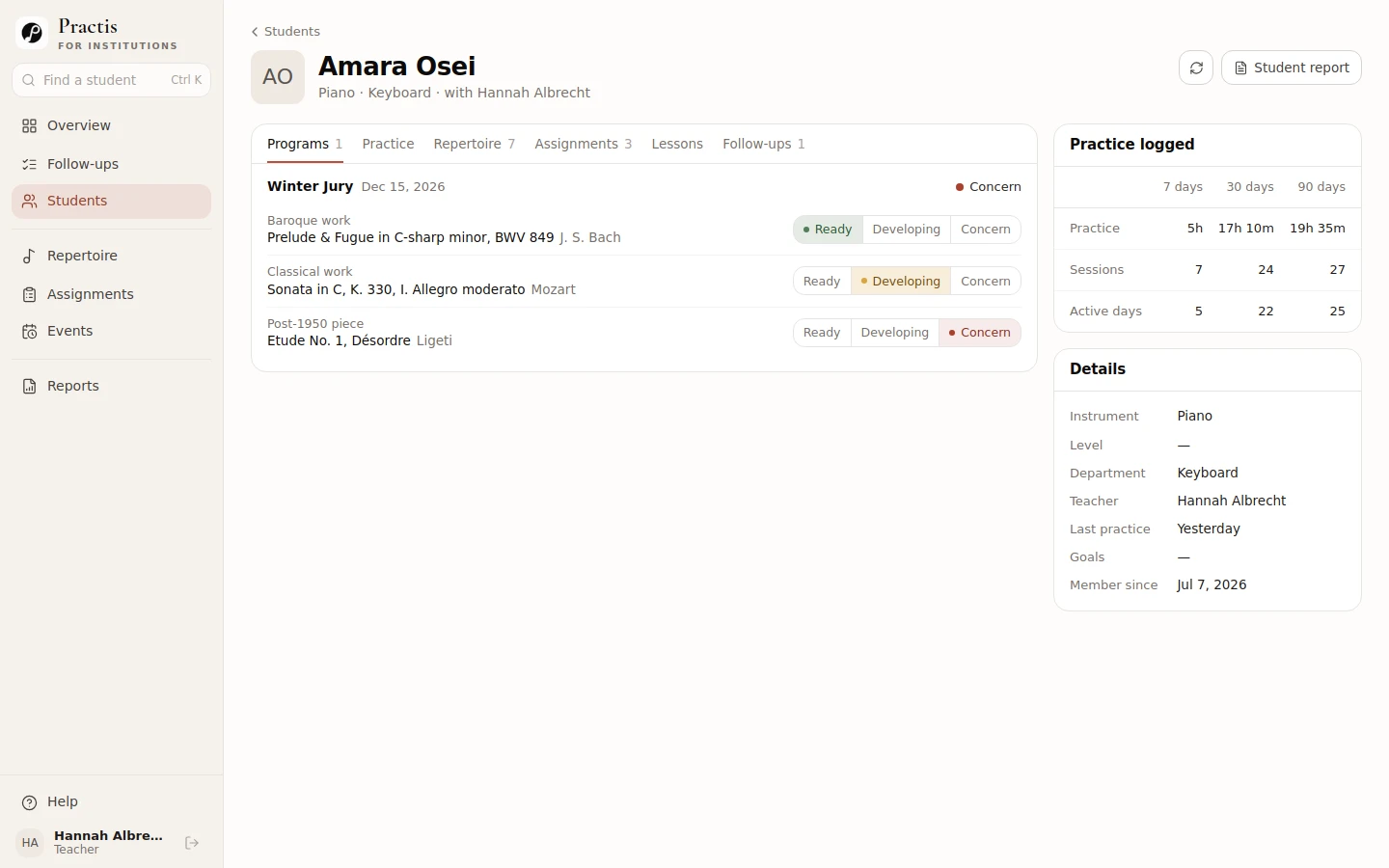
Now imagine the teacher proposes replacing the final piece. That creates several different decisions. The replacement must satisfy the event’s repertoire requirement; the teacher must judge its preparation; the student and any collaborating musician must have the right material; and the panel must see the programme that is actually being presented.
A useful change request
“Replace the post-1950 work with the following title and movement. The teacher has approved the choice and will review a complete run on Thursday. The coordinator will confirm the final programme after that review and send the changed version to the panel.”
This is a fictional example of a clear request. The repertoire choice, musical judgement and distribution of the final version each have an owner.
In Practis, faculty can review the changed repertoire and preparation context. In the scheduling and assessment system, the coordinator needs the accepted programme to reach the right jury entry. If those are separate products, make the handover explicit. Do not assume that a change in one application updates another: no native Practis integration with The Jury-System is established here.
Suppose Thursday’s review still raises a concern. The teacher’s note can explain what remains unsettled, but the decision to proceed, defer or permit a different programme must follow the school’s policy. A red label cannot make that academic decision on its own.
After the performance, retain the official panel record and bring the useful teaching action back into the student’s continuing work. “Discuss the balance in the second movement at the next lesson” is actionable context. It should not replace, paraphrase away or silently amend the original evaluation.
This example is also a good buying demonstration. Ask each proposed setup to carry the same change through the process. Watch who has to enter it twice, who receives a notification, what the panel actually opens and which record survives afterward. The answer is more revealing than a screen full of feature ticks.
What the budget needs to include
The Jury-System publishes annual subscription bands and separate setup fees. The examples below use its rate-structure page for fewer than 100 active users. They are arithmetic examples from that page, not a supplier quotation.
Prices checked 6 November 2026, in US dollars. The supplier does not state tax treatment on the rate page. Its registration page displays different annual prices, so confirm the applicable rate and user count in writing before ordering.
| Under 100 active users | Annual subscription | Initial setup | First-year arithmetic |
|---|---|---|---|
| Internal accounts, without SSO | $400 | $300 | $700 |
| Single sign-on | $500 | $650 | $1,150 |
Confirm who counts as an active user, which events the subscription covers and what your own IT team must do for single sign-on. The difference between these two examples is $450 in the first year, but institutional access requirements may decide the choice before price does.
For Practis, request an institution quote covering your student and staff scope, onboarding, support and contract period. An individual Practis Pro price is not a substitute for a school quotation.
For a forms-and-spreadsheet approach, include any licence cost your school does not already cover, plus the staff work you observed. For a two-product approach, add both subscriptions and the work of keeping the agreed programme aligned. Avoid buying the same function twice while leaving the troublesome handover entirely manual.
Keep your comparison editable
Download the jury-software comparison (CSV). It includes the main jobs, the current comparison and space for your school’s requirements and demonstration notes. Open it in a spreadsheet and replace the examples with your own process.
Take one programme to the demonstration
You will learn more from a realistic sequence than from a general tour. Use fictional names and ordinary repertoire details; you do not need to send a prospective supplier confidential student records.
- Submit an incomplete programme. Can the responsible teacher see exactly what is missing, and can the coordinator distinguish an incomplete requirement from a piece awaiting review?
- Change a movement after approval. Identify who can accept the change and how the panel’s copy is corrected. Ask the same question about the pianist’s information.
- Open the student as two different staff roles. Check what a rostered teacher and a department head can view or change. A visible button and an enforced permission are different things.
- Complete the assessment and correct one mistake. Establish where individual evaluations live, who can amend them, what the student receives and what remains in the official record.
- Return to teaching. Show where the agreed next action lives and who will review it. The jury is finished; the student’s work continues.
The wider conservatory vendor questions cover contracts and access, while a one-term pilot can test whether the proposed arrangement fits your staff. For the jury decision itself, write down the exact point where the current process fails and ask the supplier to carry your example through it. You should leave knowing who owns the programme, where the official assessment lives, and how a correction reaches the people who need it.


