Your digital piano’s keys can control a completely different instrument on a computer. That opens up a useful choice: a piano generated by a physical model, such as Pianoteq, or one built from recordings, such as Native Instruments’ Noire. The choice involves the sound you want, but also the computer, storage and controls you will use every day.
Try Pianoteq 9 Stage first if you want a small installation and a choice of piano models. Noire is the more specific purchase: choose it because you want its recorded grand piano, its separate felt version and its tools for creating moving textures. This comparison uses the current manuals and product information; we have not run a matched playing or latency test.
A modelled piano and a recorded piano
Pianoteq calculates the instrument’s response as you play. Its model includes the interaction of the vibrating strings, soundboard and pedals. That is why it can offer several instruments without downloading a large collection of recorded notes. Modartt describes a footprint of roughly 50 MB.
Noire starts with recordings of Nils Frahm’s Yamaha CFX grand at the Funkhaus in Berlin. It contains two instruments: Pure, recorded without the felt preparation, and Felt, recorded with felt between the hammers and strings. It is a 16 GB library. Those are different starting sounds from the same piano, rather than two unrelated grands. See Noire’s instruments and specifications.
Neither method settles which one you will prefer. A recording preserves choices made when that piano was prepared and recorded; a model offers a different route to changing the instrument. Both products also have effects and response controls. A sampled piano is not limited to playing back an unchangeable sound.
What Pianoteq Stage gives you
Stage includes two instrument packs of your choice. If your main purpose is piano playing, choose the piano packs you actually want during registration; the presence of other instruments in the trial does not mean every pack is included in the purchase. Additional packs are sold separately.
You can adjust the velocity curve, EQ, reverb and effects. The velocity curve is particularly useful: it changes how the force of your playing maps to the software’s response, so quiet notes need not feel unreachable on your particular keyboard. Stage uses the same sound engine as the higher editions. Compare Stage’s included features.
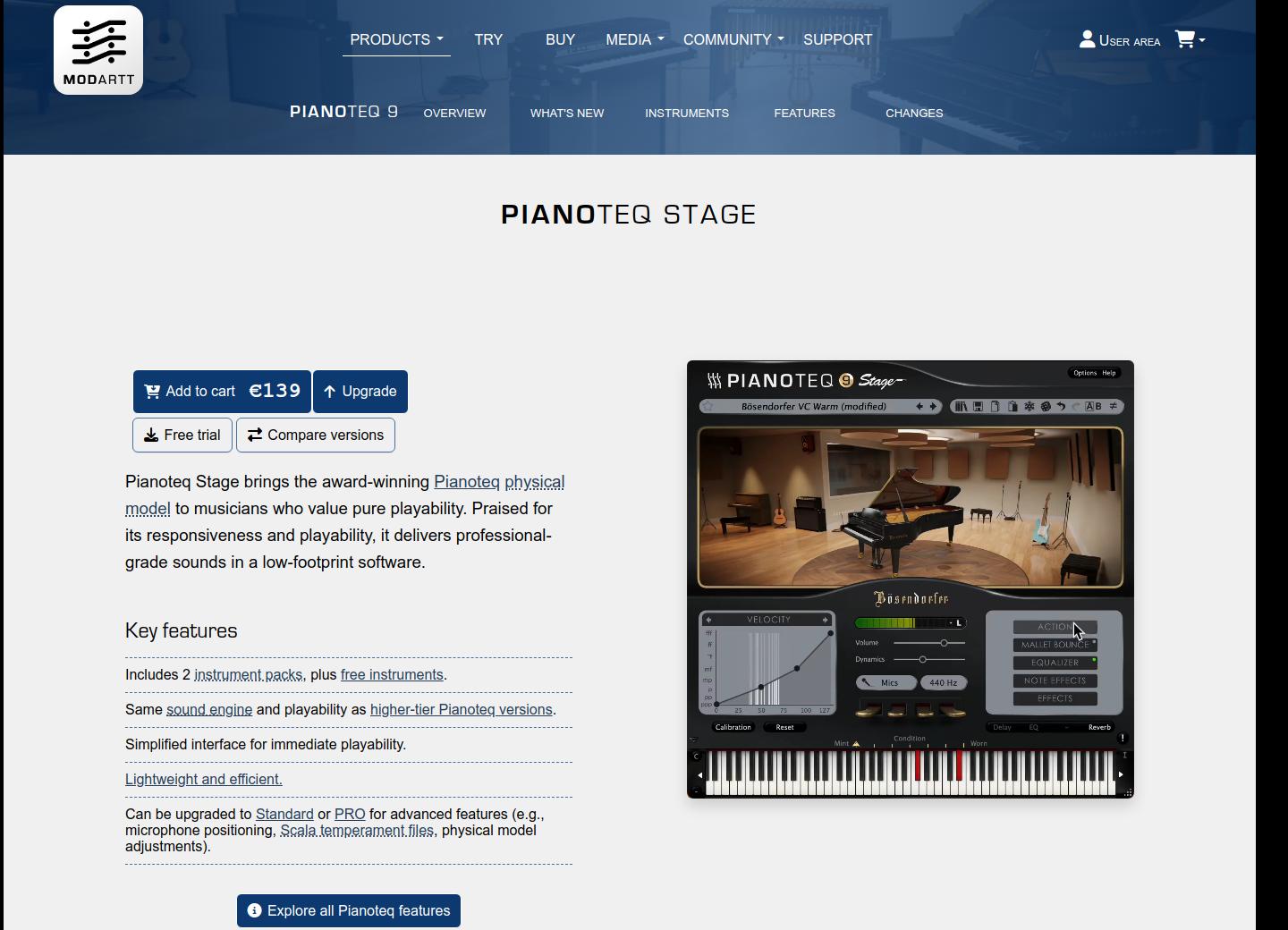
The boundary matters if sound design is your reason for buying. Freely repositioning virtual microphones, editing the physical model and morphing instruments belong to Pianoteq Standard or higher. Standard includes three packs and costs more. Do not buy Stage expecting every control shown in a Standard or Pro demonstration.
What makes Noire a different choice
Noire’s appeal is the particular instrument and the ways you can turn it into a composition. Its Particles Engine generates additional notes and textures in response to what you play. That can be useful when a few piano notes need to support a wider atmosphere. It is optional; you can also play the piano on its own.
The controls extend beyond a wet/dry effects knob. You can change the balance of release sounds, resonance, overtones and mechanical noises, and choose a velocity response for your keyboard. The Noire manual explains these separately, which helps when a preset has more noise or ambience than you want.
The compromise is that you are buying this piano’s recorded material. Its range of presets does not turn it into Pianoteq’s collection of different instrument models. If the Pure and Felt demonstrations do not appeal to you, a long feature list is a poor reason to buy it.
Native Instruments’ walkthrough shows how those controls shape Noire’s piano and textures:
Check the computer before the sound
Pianoteq 9 runs on Windows, macOS and Linux, and also has an iOS version. This comparison concerns the computer setup. Its current desktop manual lists Windows 10 or later, macOS 10.13 or later, and Linux. A small installation does not guarantee that every computer will handle the settings you choose: the sound is being calculated in real time. Use the trial on the machine you intend to play through. Pianoteq setup and hardware requirements.
Noire runs inside Kontakt or the free Kontakt Player. You do not need to buy the full version of Kontakt, and you do not need a paid recording program just to play: Kontakt Player can run by itself. Noire currently specifies Kontakt 7.6 or newer.
For a fresh installation using the current Kontakt Player, check the host requirements too: Windows 10/11 or macOS 14, 15 or 26; at least 4 GB of RAM, with 6 GB recommended. Allow space for both Noire’s 16 GB library and the player’s 2 GB requirement, plus installation headroom. An older compatible Kontakt installation is a separate case; do not assume the newest Player will install on an older Mac.
Linux users have a supported Pianoteq option, while Kontakt Player is offered for Windows and macOS. For a Windows-on-ARM laptop, NI currently says its products are unsupported. Check that before buying Noire for a new Snapdragon machine.
Getting from the keys to the headphones
The software does not replace the action beneath your fingers. Your keyboard sends performance instructions to the computer, and the computer produces the new sound. It helps to keep those two connections separate:
- Keyboard and pedal → computer: MIDI carries notes, velocity and pedal messages, usually through USB.
- Inside the computer: Pianoteq, or Noire loaded in Kontakt Player, produces audio.
- Computer or audio interface → wired headphones/speakers: this is where you hear the software instrument.
Connecting USB-MIDI does not automatically send the new sound back through the piano’s speakers. That needs a supported audio return or a suitable audio input on the piano. Otherwise, listen from the computer or interface. Start with a wired output; our post on Bluetooth headphones and digital pianos explains why ordinary Bluetooth audio can feel late.
For half-pedalling, the whole chain must support continuous pedal values: pedal, keyboard’s MIDI output and software. Pianoteq supports progressive sustain. Noire has a Half Pedal switch in its settings, plus a separate repedalling option. An on/off pedal cannot supply the intermediate positions either instrument needs. Check your keyboard’s MIDI implementation, not just the shape of the pedal.
On Windows, Modartt recommends an ASIO driver for low latency. Your existing interface may already provide one. Buffer settings trade responsiveness against the computer’s ability to keep up; crackling at a very small buffer is a reason to adjust the setup. We cannot infer the delay you will feel from a product’s download size.
What you need to pay for
Suppose you already own a compatible computer, a velocity-sensitive MIDI keyboard, its working connection cable, a suitable pedal and wired headphones or speakers. These are the additional software purchases needed to start playing:
Pianoteq 9 Stage
€139 for Stage and two selected instrument packs. The standalone player is included.
No subscription is required. Standard is €269 if you need its deeper editing controls.
Noire + Kontakt Player
€149 for Noire; Kontakt Player is free. Allow for any tax added at checkout.
No subscription or paid Kontakt upgrade is required for this purchase. Check your existing NI licences before buying it again.
Euro prices checked 26 October 2026. Modartt includes tax; confirm Noire’s final total at checkout.
If your current keyboard cannot send MIDI, or your computer needs an audio interface or adapter, the figures above are not your complete setup cost. Establish that connection first. Buying another instrument library will not fix a missing MIDI connection or an unsuitable audio output.
Both purchases require activation. Modartt includes one year of upgrades to the same product under its sale conditions; that is not a promise of every future major version. Noire uses a Native ID account and Native Access for registration. NI’s licence terms govern personal use and activation; the purchase is separate from its subscription plans.
Listen, then try your own playing
Modartt’s demonstration below offers a first listen to Pianoteq 9. Compare the sounds that interest you with the Noire walkthrough above, bearing in mind that the performances and settings differ. Some Pianoteq controls shown belong to higher editions; neither video is a controlled comparison of responsiveness.
Modartt’s Pianoteq trial needs no registration and currently offers version 9.2.5. Eight notes are silent and it needs restarting after twenty minutes, so a missing note in the trial is not necessarily a keyboard fault. Try the same short passage at several dynamics, then a passage with pedal, using the output you will actually practise through.
That gives you a concrete decision: whether the sounds you want are included, whether the response suits your keyboard, and whether the computer can play them comfortably. For Noire, begin with the Pure and Felt examples before being drawn into the more elaborate textures.
Featured photo: John Taran / Pexels. Illustrative studio photograph, not a tested setup.