Andante does not currently have an Android version. Its developer’s help page says Android is not in active development, although a future version remains possible. If you are changing from an iPhone, plan to preserve the practice history you care about before handing over the old device.
There are two sensible routes: keep using Andante on a compatible Apple device you retain, or save an archive and begin new entries in an Android or web diary. Moving the history automatically into a different app is a separate capability. This guide explains the documented options and the checks to make yourself; we have not performed an Andante-to-Practis migration.
Featured photograph: cottonbro studio / Pexels. Platform information checked 10 November 2026.
You may not need to leave your old diary immediately
If an iPad is already part of your practice setup, a new Android phone need not decide where the diary lives. Andante’s App Store listing describes iCloud syncing between iPhone and iPad. Before relying on that route, open a recent session, a journal entry and an important recording on the device you will keep.
Continuing on the iPad may be the least disruptive choice if it stays beside your instrument. It is less convenient if you need to enter notes on the phone you carry to rehearsals. Make that decision around where practice actually happens.
- Keep Andante on a retained Apple device
- Useful when the existing diary suits you and you still have a convenient way to open it. Check the actual records there before retiring the iPhone.
- Keep an archive and start a new diary
- Useful when Android or a browser must become your everyday workspace. Save the old material, choose a clear start date, and bring across the notes needed for your current pieces.
Your phone’s general transfer wizard is not evidence that a music journal has moved. Google’s current transfer guidance says supported data varies by device and method, and app-data transfer depends on developer support. It does not establish a way to turn an Andante library into another practice app’s records.
Export the practice log while you can still open it
Andante documents CSV export as an Andante Pro feature. Its route is profile icon → Export Practice Log. If you do not already have Pro, check the offer and export access in your app before paying; the public store lists several purchase amounts without making the relevant offer clear enough to quote a single price here.
Save the resulting file somewhere you can reach independently of the old phone, then open it on your computer or new device. Keep the original download unchanged. Work on a copy if you want to sort entries, calculate totals or tidy the presentation.
Choose a few entries you can recognise rather than inspecting every row:
- A recent session with a duration you remember.
- An older session from near the beginning of the history you want.
- A session with a long or particularly useful note.
- An entry from another instrument or profile, if you use more than one.
Compare those records with the app. Check which dates and profiles the file covers and whether the duration means minutes, hours or something else. The public help does not specify the export’s full columns or coverage, so the downloaded file is where you establish those details for your own version.
A spreadsheet that opens successfully can still misunderstand dates or durations. Our practice-log export comparison shows concrete examples of those problems and how to check a file. Its tested examples are from Practis and Mirubato; they do not establish Andante’s export format.
Check journal entries and recordings separately
A list of practice sessions is only part of what you may want to keep. A paragraph about last month’s lesson or a recording of a first successful run can matter more than the total minutes. Do not assume either is preserved merely because a CSV exists.
Start with the material you would miss. Open the journal entry with your current interpretation notes. Find the take you use as a reference. For each, establish whether you have a readable or playable copy outside the app.
If your installed version offers a sharing or export control, save one item and open the result on the destination device before repeating the process. For text without a usable export, copying the important passage into a document or retaining legible screenshots can preserve a reading copy. Keep the title, date and piece with it, so the note still makes sense later.
For audio, you need a playable file, not a screenshot of its waveform or a filename in a spreadsheet. If you cannot find a supported way to save it, use the contact link in Andante’s help page to ask the developer about recording export. Keep access to the original device while that is unresolved.
Name saved material so you can connect it later: for example, a date, piece title and “opening before lesson.” A second copy on another device or in your own cloud storage is useful. Open that copy too; the existence of a folder is not a check that its contents survived.
Bring the next practice task across first
You do not need to retype two years of sessions before practising again. Keep the archive for reference and make a short handover note for each piece you are actively playing. Include what is working, what remains unsettled and where to restart.
For example, a singer moving diaries could carry this note forward. It is an illustration, not an exported record or a customer’s experience:
Song for December recital, second verse
The entrance is reliable when starting from the previous phrase. Starting directly on the entry still feels uncertain. Keep the breath mark agreed in the lesson.
Next time: begin two bars earlier, sing through the entrance, then try the same approach with the accompaniment. Compare with the reference take saved as “2026-11-08_second-verse.”
This gives the next session somewhere to begin. An old total tells you that work happened; a specific note helps you continue it. Keep longer reflections in the archive where you can return to them.
Starting in Practis on Android or the web
Practis, our app, is available on Google Play and through the web diary. You can begin with the Free plan and a small current repertoire. There is no automatic Andante CSV import in this workflow. Your retained archive and newly logged practice remain separate.
Add one piece you are working on and keep its useful handover note with the piece. The repertoire screen below shows the Android interface; it is not a picture of transferred Andante data.
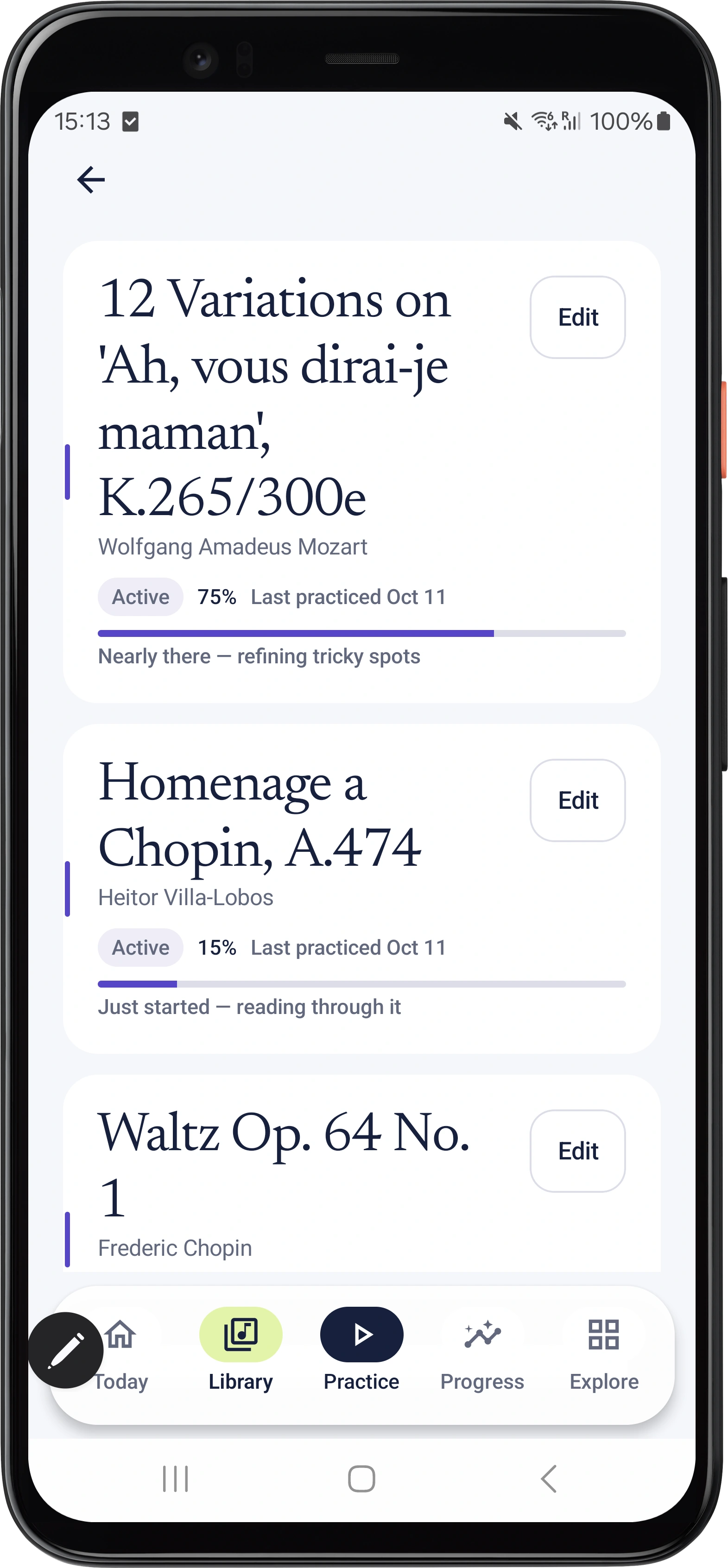
After your next real practice session, save its duration and a brief note about what happened. On the web, the manual log lets you choose the piece, date and duration and add notes. Reopen the saved entry to check that it belongs to the intended piece.
If you want the phone and browser together, use the same Practis account on both. Our iPhone, Android and web setup guide explains that arrangement and the differences in billing and platform features.
Choose an unambiguous changeover date. Keep earlier sessions in the old archive and record subsequent practice in the new diary. If you manually add selected older sessions, preserve their actual dates and durations; do not enter a whole year’s total as one session today. That would make the new charts harder to interpret.
Before erasing or returning the old phone, open the saved log, read the notes you chose to preserve and play the recordings you care about from their new location. Then check that your next session has a home. The useful result is being able to continue the work without losing the parts of its history that matter to you.