By November, your most-played recording might be the accompaniment you use to practise a tricky entrance. You may admire the music, but listening to the same eight bars forty times is a peculiar way to describe your taste. Spotify has controls for this, and choosing between a playlist and an individual track matters more than the name of the playlist.
For a dedicated rehearsal playlist, start with “Exclude from your taste profile.” For one recording you want excluded wherever you play it, use the track-level option. Spotify's November 2026 Wrapped guidance recommends these controls for listening you do not want shaping your recap. The editable feature called Taste Profile (Beta) is a different tool: it changes Home recommendations, not Wrapped.
Featured photograph: Kaboompics / Pexels.
Exclude the rehearsal context, or exclude the recording?
A playlist gives you a useful boundary. Imagine a guitarist learning twenty songs for a wedding band. The rehearsal list contains the agreed recordings, including the particular live version with an extra chorus. The guitarist also enjoys several of those songs outside rehearsals. Excluding the working playlist lets that choice remain distinct from listening for pleasure.
There is a catch: Spotify says that playing a song outside the excluded playlist, including from Liked Songs, still counts towards your taste profile. If you keep searching for the recording and pressing play from the search result, you have stepped outside the playlist's exclusion. Its support page explains the distinction.
That makes the practical choice straightforward. Keep using the rehearsal playlist when the context is what you want to exclude. Exclude the individual track when that recording is purely a tool for you, such as a counting track or accompaniment you would not otherwise choose to hear. You do not need to purge every piece you have studied. A reference performance can be both useful work and music you love.
Two versions of the same decision
A singer rehearses with a piano-only accompaniment but listens to the original cast recording on the way home. Excluding the accompaniment track targets that particular recording. If the singer instead puts several reference performances into a rehearsal playlist, excluding the playlist targets listening in that context. The title of the song alone does not describe the choice.
For a band, name the working playlist after the actual project, such as “December set: agreed versions.” That also makes it easier to find the right arrangement when someone changes a key or ending. Our post on preparing a cover-band set explains what else needs to be agreed before rehearsal.
Where to change the setting
Spotify announced track and playlist exclusions for Free and Premium accounts on web, desktop, iOS and Android. You do not need to buy a subscription just for this control. The steps below follow Spotify’s published availability and instructions; wording and placement can vary with the app version.
- Open the playlist or recording you want to exclude.
- Open its three-dot menu.
- Choose Exclude from your taste profile for a playlist, or Exclude track from your taste profile for a track.
- To reverse the choice, return to that menu and select the corresponding Include option.
You are changing how listening contributes to personalisation, not deleting the music. Spotify allows up to 48 hours for an exclusion to take effect; a scheduled recommendation such as Discover Weekly may change the following week. An unchanged screen straight after the switch does not establish that it failed.
Keep a simple record of what you changed if you have several rehearsal lists. “Excluded the autumn audition playlist” is enough. It is easier to revisit that decision after the audition than to remember which of several similarly named lists you altered months earlier.
Similar-looking controls do different jobs
“Taste profile” appears in more than one part of Spotify. Before changing several settings at once, choose the job you actually want done.
| Your situation | The useful control |
|---|---|
| A dedicated practice playlist dominates your listening. | Exclude the playlist, then play rehearsal music from that list. |
| One backing track follows you into several playlists. | Exclude that individual recording. |
| You have one unusual listening session ahead. | Consider Private Session, remembering that it expires. |
| Children's music played for the family dominates your recap. | Review the separate kids-and-family music toggle. |
| Your Home recommendations need a different direction. | Taste Profile (Beta) can address Home; it is not the Wrapped control. |
Private Session is temporary
Private Session can suit a one-off listening job: an evening choosing music for an event, for example. Spotify says listening during it does not shape recommendations or appear in Wrapped. It applies across your account's devices, and ends after six hours or when you restart the app. It does not retrospectively change an earlier session.
On mobile, the documented route is your profile picture, Settings and privacy, then Privacy and social. On desktop, open the profile menu and choose Private session. For a playlist you return to every day, a persistent exclusion is easier to manage than remembering a temporary switch before each rehearsal.
Family listening has its own control
Spotify's kids-and-family music setting sits under Settings and privacy → Content and display on mobile. Turning off Include kids and family music in taste profile keeps that category from shaping recommendations and Wrapped top songs or artists, including earlier listening. The music remains playable.
This is not a general “music I use for teaching” switch. A beginner lesson might use a folk song, a film theme or a recording made for adults. If you need to target a particular teaching playlist, choose that playlist rather than assuming Spotify's family category covers everything in it.
The editable Taste Profile does not change Wrapped
In Taste Profile (Beta), eligible Premium mobile users aged 18 or over can describe how they want their recommendations to change. Spotify explicitly limits its effect to Home recommendations. Telling that feature “these backing tracks are for practice” is not a substitute for excluding the tracks or playlist when Wrapped is the concern.
Keep something better than a listening total from the practice itself
A rehearsal recording can run while you mark a score, talk through an ending or wait for another player. Conversely, an hour at an acoustic instrument might involve no streaming at all. A listening recap cannot tell you what happened in either session.
If you want a record of the year as a musician, start with a few things you can actually revisit: the pieces you worked on, a recording that shows an earlier attempt, and a note about what changed. You can keep those in a notebook or a practice diary. Practis is our app; its history view brings logged sessions and notes together without treating Spotify streams as practice.
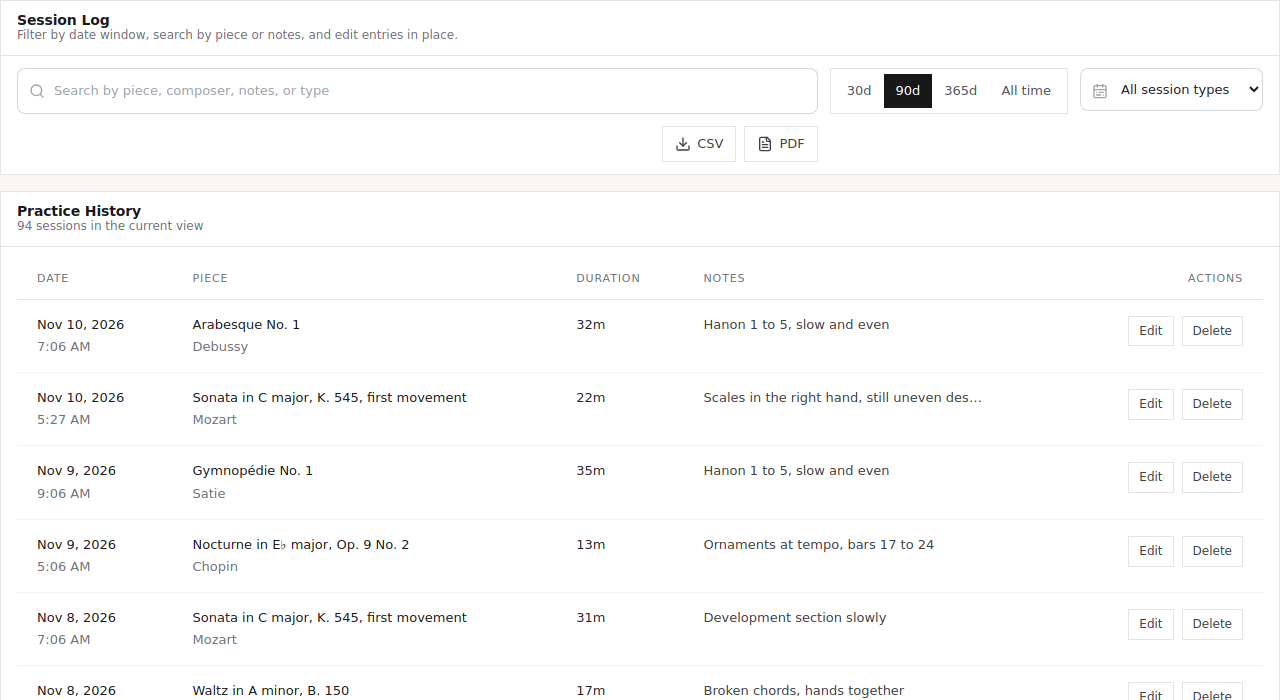
For example, a clarinettist's useful entry might look like this:
Tuesday, 25 minutes. Worked on the entrance after the long rest. The cue in the bass part was easier to follow than counting alone. Next time, try the entry from the previous section before turning the reference recording on.
That is a fictional example, not a measured outcome. Its value is the specific reminder waiting at the next rehearsal. Our guide to keeping a practice diary develops that approach, including what to record when a session feels unfinished.
Before the recap arrives
Review the small number of playlists you use as tools: rehearsal versions, accompaniments, teaching material and repeated listening exercises. Keep the ones you are happy to have shape your recommendations. For the others, choose the narrowest exclusion that fits how you actually listen.
Spotify's current preparation advice is a reason to check those settings now, not a promise that you can design every detail of the finished recap. When the project ends, revisit the exclusion. A recording you used to learn the part might be one you want to hear again simply for pleasure.