

Photo: Qing Luo / Pexels.
If you play a written C on a B-flat clarinet and the tuner shows B-flat, that may be exactly right. The score gives your instrument's written note; an ordinary chromatic tuner reports the sounding note. A piano or backing track uses that sounding, or concert, pitch too.
Before adjusting your instrument, establish which label each tool is showing. A different note name can be a transposition issue. A small sharp or flat reading against the correct sounding note is an intonation issue. They need different solutions.
Start with the note everyone can hear
Concert pitch gives the group a common language. When a bandleader calls “concert B-flat,” a pianist plays B-flat, a B-flat clarinettist plays written C, and an E-flat alto saxophonist plays written G. The page labels differ because the instruments transpose; the intended sounding pitch class is the same.
The instrument's name is a useful starting point: a B-flat instrument produces a B-flat when it plays written C; an E-flat instrument produces an E-flat. It does not mean the instrument can only play music in that key. Yamaha's saxophone guide explains this relationship and why shared fingerings can produce different sounds on different saxophones.
There is an octave detail as well. Here, C4 means middle C, and C5 is the C an octave above it. This table gives actual sounding pitches, rather than just note names. It uses the usual treble-clef parts for these instruments.
| Instrument | Written C5 sounds as | Sound is lower by | To write a concert note |
|---|---|---|---|
| B-flat clarinet or B-flat trumpet | B♭4 | Major second: 2 semitones | Up a major second |
| E-flat alto saxophone | E♭4 | Major sixth: 9 semitones | Up a major sixth |
| B-flat tenor saxophone | B♭3 | Major ninth: 14 semitones | Up an octave and a major second |
| E-flat baritone saxophone | E♭3 | Major thirteenth: 21 semitones | Up an octave and a major sixth |
Tenor therefore sounds an octave below a B-flat clarinet playing the same written note; baritone sounds an octave below alto. Susan de Ghizé's transposing-instrument chapter explains those compound intervals. Keeping the octave matters when matching a piano note, checking a drone or arranging a unison line.
Check the instrument named at the top of the part. An A clarinet, an E-flat clarinet and a C trumpet require different relationships. The table is not a rule for every member of a woodwind or brass family.
Follow one four-note phrase through the parts
Here is an original one-bar example in concert B-flat major. The sounding notes are:
B♭3 · C4 · D4 · F4
The clarinet or trumpet version is written C4–D4–E4–G4. The alto version is G4–A4–B4–D5. Although the key signatures and staff positions differ, both produce the four concert pitches above. The tenor and baritone lines need the additional written octave shown below to produce that same register.
On a phone, scroll the notation sideways or open the full-size image.
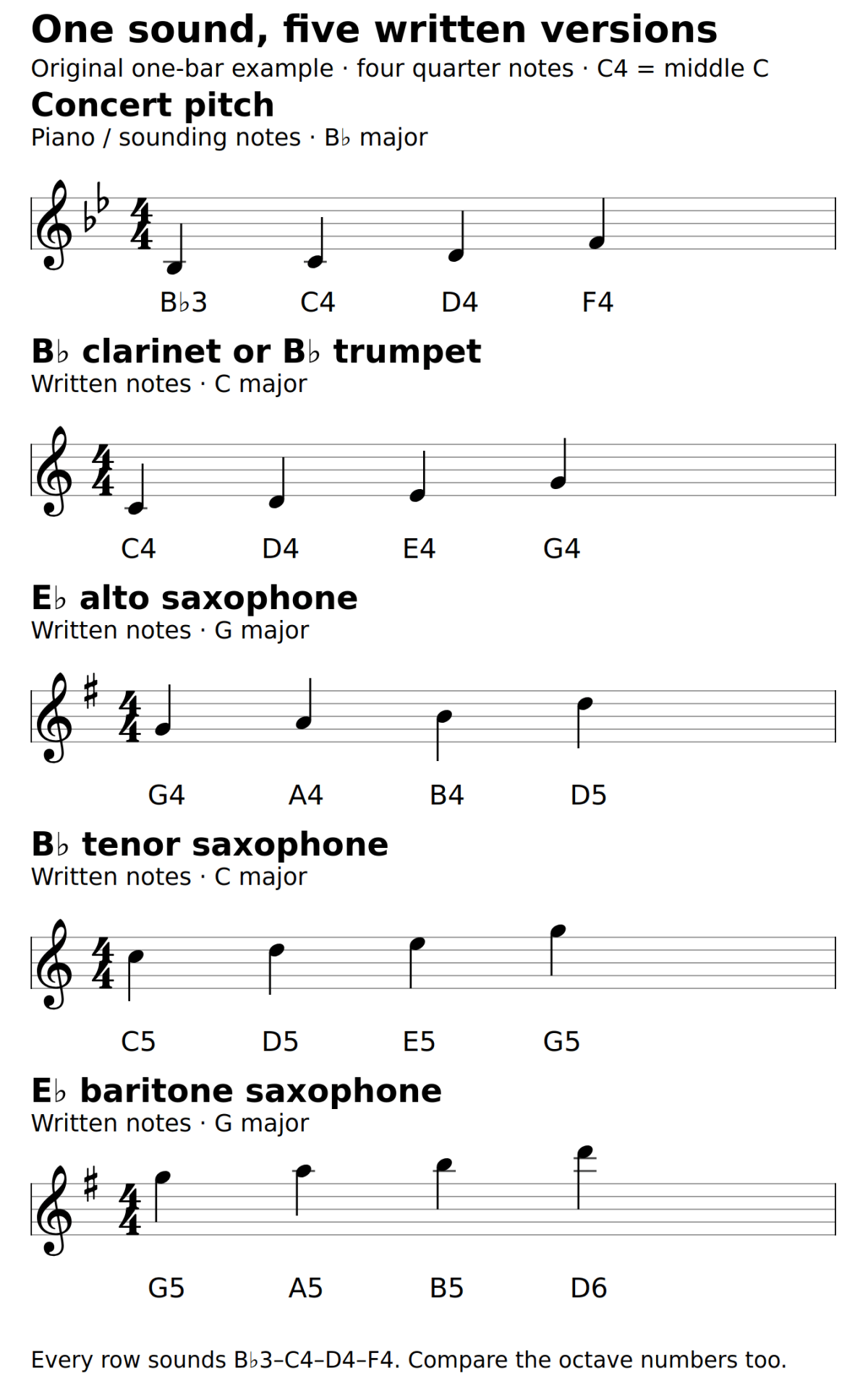
Use the example as a translation exercise first. Point to the first note in your row, name its written pitch, then name the sound the pianist would play. Do that for all four notes before trying the phrase. If a pianist is available, compare one comfortable note at a time rather than racing through the bar.
When transposing a melody, move every note by the same interval, including its accidentals. For a B-flat part, concert F-sharp becomes written G-sharp. Moving only the key signature leaves individual notes in the wrong places. For an E-flat part, preserve the correct letter spelling as well as the keyboard distance; that keeps the melodic intervals readable.
If you prepare the part in notation software, check its view before doing another transpose. MuseScore Studio's handbook distinguishes concert-pitch display from the written notation used by transposing instruments. A score can already contain the correct relationship even when the notes on screen change with the display setting. Our scanned-score transposition guide covers converting a PDF when you actually need an editable part.
Set the tuner to a label you understand
You have two sensible choices. Leave the tuner in concert pitch and translate the note you expect, or use an explicit instrument-transposition mode so the display matches your written note. Either can work. What causes trouble is assuming the second behaviour while the tuner is doing the first.
With a concert-pitch display, written C5 on a B-flat clarinet should centre around B♭4. Written C5 on alto should centre around E♭4. If the display uses sharps, the clarinet's B-flat may appear as A-sharp: those are equivalent pitches in equal temperament, though B-flat is the useful spelling here.
TonalEnergy's Android user guide documents an instrument selection that can set transposition automatically, alongside a separate Concert A reference setting. An alto selection and an E-flat transposition therefore have a defined purpose there. Check the displayed mode whenever you change instruments; a saved setting from yesterday's tenor practice can confuse today's flute or piano session.
What Stimmung's controls actually change
Stimmung is our Android tuner. Its controls illustrate a different setup: Chromatic and Voice / Winds are tuner presets, while Concert pitch sets the A4 reference frequency. In the inspected version, the Voice / Winds preset changes the detection range; it does not turn a sounding B-flat into a displayed written C.

Key center is not an instrument-transposition switch. Choosing B-flat there supplies a key context for tuning systems that use one; it does not mean “I play B-flat clarinet.” For straightforward comparison with an equal-tempered backing track, select Equal temperament, use the agreed A4 reference, and expect concert note names. The visible reference, temperament and note-label controls were checked against the Android implementation; this is not a claim of a live microphone test.
There are two meanings of “concert pitch” in this discussion. Concert B-flat names a sounding note. A4 = 440 Hz, or an ensemble's chosen alternative, specifies the tuning reference. Changing 440 to 442 raises the reference by about eight cents; transposing a B-flat part changes its note labels by a whole tone, or 200 cents. Moving the reference slider is not the way to reconcile those labels.
Once the expected note name is correct, use the cents indication to work on intonation. Do not push or pull the instrument until a correctly sounding B-flat becomes C merely because C is printed on your part.
Keep the backing track in the concert key
Suppose the pianist and backing track are in concert B-flat major. Your B-flat clarinet or trumpet part will normally be in C major; the alto or baritone part will be in G major. Leave a correctly prepared backing track in B-flat. Changing it to C just because your clarinet part has no sharps or flats moves the accompaniment away from your part.
Another rehearsal key: A concert F-major track goes with a written G-major part for B-flat instruments and a written D-major part for E-flat instruments.
If the band changes to concert E-flat: the corresponding written keys become F major for B-flat instruments and C major for E-flat instruments. Everyone changes the sounding key together.
Some backing apps show a transposed chart while retaining concert-pitch playback. In iReal Pro's documented setup, the Transposing instrument setting changes the chord display globally. For concert B-flat, a B-flat player sees C and an E-flat player sees G. The player's key selector still chooses the concert key. Those controls solve different jobs.
For an existing iReal Pro user, that gives a clear check: select the actual concert playback key, then select the instrument's chart display. Do not rewrite the stored chart into your instrument's written key and apply the same display conversion again. If a chart was entered from a transposed part, establish what the stored chords represent before changing settings.
With an ordinary audio file, there may be no written-pitch display at all. Read the provider's key description, identify the intended concert key and compare a known note or chord. A track labelled “for B-flat instruments” may already be the correct accompaniment for the supplied part; it does not automatically need a two-semitone shift. Ask what the label means if the notes and audio disagree.
When an actual key change is needed, work from the sound you have to the sound you want. Moving a concert C track to concert B-flat means two semitones down. A tenor does not require that whole backing band to drop fourteen semitones: the extra octave in its notation concerns the instrument's register, not a requirement to transpose the accompaniment into the bass. Our backing-track tool comparison covers the broader choice of playback tools.
Diagnose the mismatch before changing the music
The tuner consistently shows the “wrong” note name: check concert versus written display, the instrument selected and enharmonic spelling. A stable, predictable interval is a reason to inspect the setup before treating it as an embouchure problem.
The name matches but the sound is an octave away: compare octave numbers and the part's register. In our example, tenor written C4 would produce B♭2, while written C5 produces B♭3. The name B-flat alone cannot distinguish them. A tuner can also latch onto an overtone, so confirm with a known piano or drone note before rewriting a passage.
The solo line and track clash all the way through: check the concert key, any pitch-shift setting and whether the part was already transposed. If the first note agrees but later notes do not, inspect accidentals and the actual arrangement; a global shift cannot repair one incorrectly copied F-sharp.
Only some notes drift sharp or flat: first confirm the shared reference and temperament, then work on the playing. Correct transposition does not guarantee even intonation throughout an instrument's range.
Leave home with three agreed settings
Before rehearsal, establish the concert key, the part's instrument and the ensemble's tuning reference. Put them where you will see them beside the music:
Example rehearsal note: “Concert B-flat major. Alto part in written G major. Tuner shows concert notes. A4 = 440 Hz as agreed with the accompanist. First note: written G4, sounding B♭3.”
- Check the instrument name and key signature on the part, including whether software is showing concert or written pitch.
- Sound one known note and compare it with the tuner or piano, including its octave.
- Start the backing track and confirm its concert key before playing the full passage.
That short exchange is part of preparing to play together. Our guide to ensemble preparation in solo practice takes the next step: learning the cues, entries and listening jobs once everyone is working from the same sounding music.


