Photo: Caleb Oquendo / Pexels.
By the end of a useful setup afternoon, a student should be able to save a practice record and the right teacher should be able to find it. That sounds modest until you try the whole journey on two different devices, with someone who has never seen the software. This guide gives a small music-school team a two-hour workshop for getting that first shared workflow running.
What needs to be ready before the afternoon
The workshop starts after the school has chosen a service, arranged access and completed its required data-protection review. Procurement, account provisioning and a full school rollout sit outside these two hours. If you are still comparing platforms, our music-school practice-log buyer's guide covers that earlier decision.
Bring one person responsible for the setup, two teachers and a small group of willing students. Six students is a manageable example for this exercise, not a research-backed ideal. Have the student-to-teacher list ready, agree who will answer access questions, and ask participants to bring the device they expect to use at home. Keep existing lesson scheduling and billing unchanged.
Before sending invitations, confirm what information the school intends to collect, who needs to see it and how long it will be retained. For schools in England, the Department for Education's data-sharing guidance sets out questions about purpose, permissions and secure sharing. Other jurisdictions have their own requirements; the school's responsible data-protection lead should settle those beforehand, particularly where children are involved.
The Education Endowment Foundation separates implementation into exploration, preparation, delivery and sustained use. This afternoon sits between preparation and initial delivery. Here is a suggested running order; allow more time when an access problem needs fixing.
Workshop running order
2hOne small group. Four checks before anyone goes home.
- 00:00–00:30Connect the roster
- 00:30–01:00Save a student record
- 01:00–01:30Check the teacher's view
- 01:30–02:00Agree the weekly handoff
00:00–00:30
Connect teachers before inviting their students
Start with the roster on paper or in the school's existing record. Each participating student needs an identified teacher and, where relevant, a department. Two students with similar names or a student taking two instruments can reveal an ambiguity before it becomes a wrong assignment. Decide which teacher owns this particular practice task.
In Practis, our institution workspace provides teacher and student invitation links. An administrator can use Settings → Invites to select the role and department; a student invitation can also auto-assign a teacher. This makes the order useful: teachers join first, then the administrator creates the appropriate student links. The interface also supports a label and a maximum number of uses.
For the six-student example, create clearly labelled links for the two teaching groups and send them through the school's usual private communication channel. A use limit is a guardrail, not proof of who opened a link. Check who actually joined and whether each student appears under the intended teacher. Revoke an invitation when it is no longer needed.
Joining the institution and having the right teacher connection are separate things to check. Someone can reach a home screen successfully while still being absent from the teacher's roster. Keep a short list of unresolved joins rather than repeatedly sending new links, and check that returning users are signing into the account they already use.
00:30–01:00
Save one small, useful practice record
Ask a teacher to give a student a task that can be attempted during the workshop. A short phrase with one audible aim works well: keeping the pulse through a rest, connecting a shift, or balancing a melody against its accompaniment. Include where to begin and what to listen for. The student should be able to explain the task before touching the timer.
Kim Mieder's NAfME guidance on independent practice recommends explicitly teaching planning, practice strategies and reflection. A new logging screen does not teach those habits by itself. During this first attempt, model a brief reflection out loud and let the student put their own observation into words.
The example below shows how a task can travel through the record. It is a sample for staff training, with deliberately narrow musical detail.
Example: a piano phrase, three handoffs
- Teacher's task
- Bars 9–12: keep counting through the rest in bar 10. Clap the rhythm, then play the phrase at 60 BPM.
- Student's record
- Worked for eight minutes. The entry after the rest was steady when clapping. It was late again when both hands played.
- Next lesson
- Begin with bar 10 and compare the clapped and two-handed versions. Check which movement delays the entry.
Save the entry, close that view and find it again. Check the piece or task label, duration and note rather than assuming the save succeeded because the screen changed. A student who cannot retrieve the record during a supported workshop is unlikely to find it easily after a busy school day.
A phone, shared family device or unreliable connection may change the routine. Agree a simple fallback, such as a paper note brought to the next lesson, for someone who cannot log immediately. Do not require a recording for this first check. One written observation is enough to test whether the information reaches the teacher.
01:00–01:30
Read the entry from the teacher's own account
Now switch people as well as screens. The assigned teacher signs into their own account on their own device and finds the student's new entry. The administrator's view cannot substitute for this test: it may have wider access. Confirm that the student, piece and note match what was just saved.
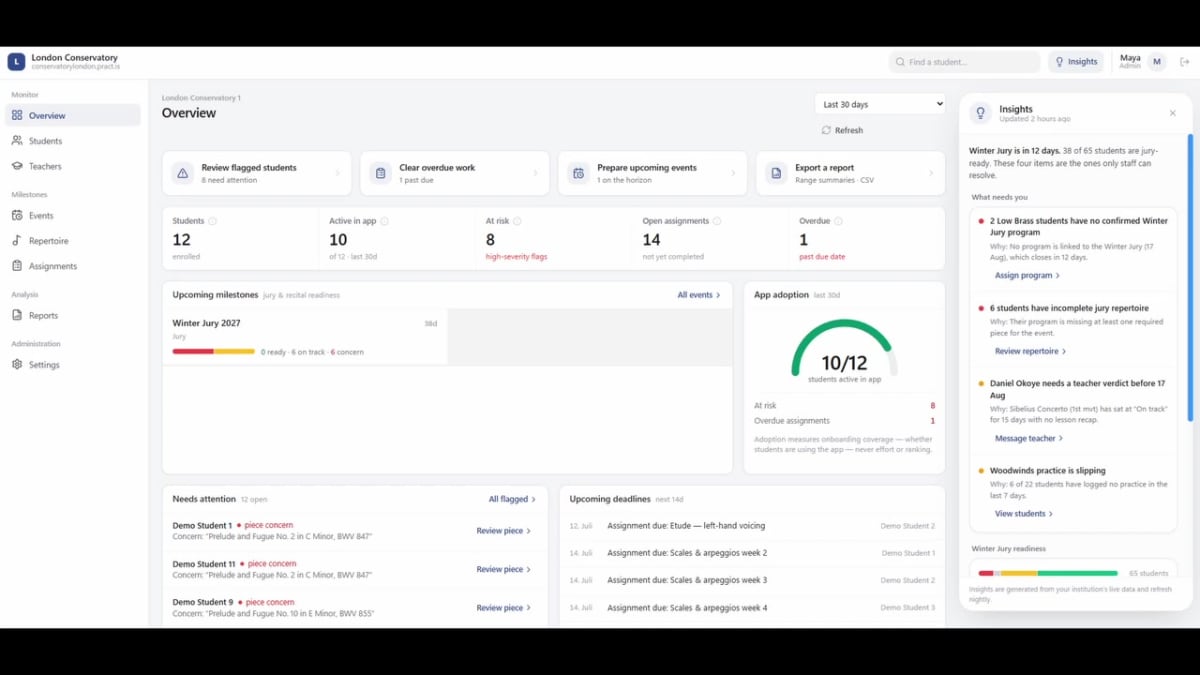
Practis separates the student journal from the institution workspace. The public demo below shows the wider staff overview, including students, teachers, repertoire and assignments. For the first afternoon, concentrate on the roster and one usable record; events and programme reporting can wait until the school has a reason to configure them.
Ask the teacher what they would do differently at the next lesson after reading the note. “Start at the rest in bar 10” is an actionable answer. “The student did eight minutes” leaves the musical decision unresolved. If the note is too vague, revise the prompt together while the student can explain what happened. Our post on making between-lesson practice visible to teachers covers the interpretation in more depth.
Also check a second teacher's account against the school's intended access boundaries. A student should not become visible to an unrelated teacher merely because everyone attended the same onboarding session. If the wrong record is visible, stop inviting more people and have the administrator or provider resolve the assignment or permission issue.
01:30–02:00
Leave with a handoff everyone understands
The final half-hour is for agreeing how this fits the teaching week. Set a review moment that teachers can actually protect, such as a brief check before the student's lesson. Tell students when their notes will normally be read. A shared record need not create an expectation that teachers answer messages every evening.
Write the logging request in language a student could remember: name the piece or task, record the time honestly, and add one observation when there is something useful to report. Keep detailed personal circumstances out of ordinary practice notes. Questions requiring a private conversation should follow the school's existing support arrangements.
In their 2025 discussion of feedback and independent musicianship, Camilla dos Santos Silva and colleagues emphasise helping students understand goals, evaluate strategies and decide what to try next. That is a useful test of the handoff: a record should help the next action become clearer. It does not need to document every repetition.
Before finishing, ask each participant to demonstrate their part without being talked through every click. Use these three sign-offs to identify what still needs help.
- StudentCan find the task, save an entry and reopen it on the device used at home.
- TeacherCan find the right student's record and name the next teaching action.
- CoordinatorHas checked the roster, recorded unresolved issues and named the person handling them.
Give the group a one-page handout with the sign-in address, the logging request, the review schedule and a support contact. There is no need to reproduce a software manual. Students wanting more guidance on the musical part can use our between-lessons practice guide.
Use the first week to find friction
Review the pilot after the first teaching cycle. Separate access problems, unclear tasks and missed review time. They can all produce an empty-looking record, but the remedies differ. Resetting a password will not help a student who understood the app and had no idea what to practise.
For a six-student group, actual counts are more useful than impressive percentages. Note how many students joined, how many could save a record independently, and how many records the teachers used before a lesson. Ask about the students who did not log before interpreting silence as no practice. A paper fallback or a forgotten account can explain a gap.
Practis's institution pilot information describes starting with one studio or department for a term, with setup taking days. The afternoon above is the group's working session within that longer process. A successful first entry is an early check; sustained use and useful lesson decisions take longer to assess.
At the next staff meeting, bring one example where a note helped the lesson and one place where someone got stuck. Fix that obstacle before extending the process to another studio. Leave with a named owner and a date for checking whether the change helped.