
Camera Mounts for Recording Piano Hands: Tripod, Desk Arm or Overhead Rig?
Find a camera mount that reaches your piano keys safely. Compare floor tripods, desk arms and overhead rigs, with fit checks before you buy.
Mia
Community & Content. Writer and lifelong pianist. Writes about gear, production, and the business side of making music.
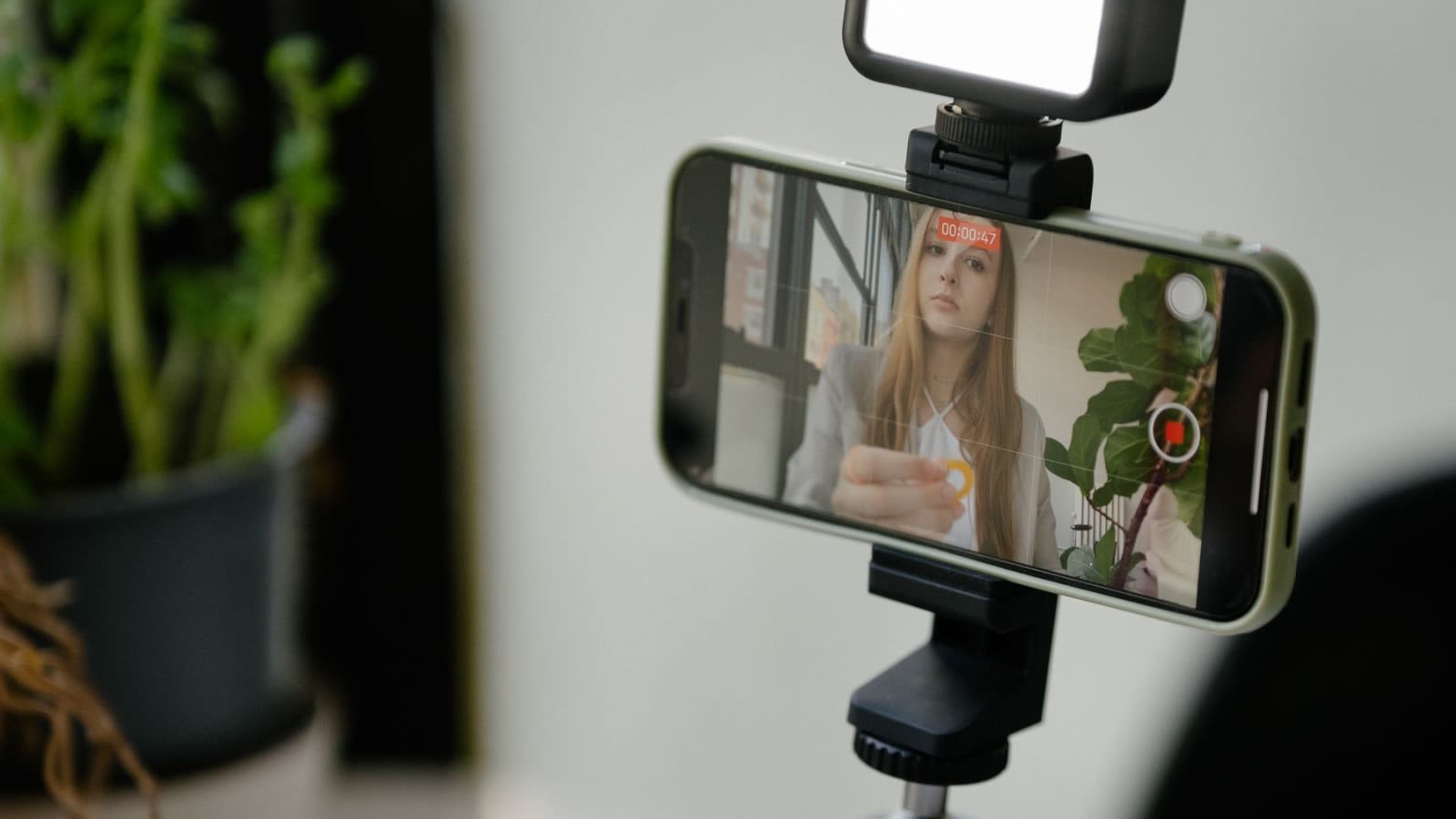
A phone can record clear piano practice while showing almost none of the useful detail. One hand disappears behind the music desk; the other fills the foreground. Before buying a taller stand, work out where the lens needs to be.
Start with a floor tripod beside the keyboard for an oblique view. A desk arm is useful when a separate, solid table is close enough to bring a light phone over the keys. A true overhead rig needs a suitable support structure and enough clearance; a small tabletop frame will not automatically fit an 88-key piano.
You need: a phone or camera you already own, its normal recording app, a tape measure and the device's weight with its case and accessories. The equipment comparison below uses published specifications checked on 25 September 2026, not physical mounting tests. No recording subscription is required for the basic setup.
Measure the lens position before the stand
Ask someone to hold the phone at a possible filming position while you sit normally. Keep it out of the player's movement path and do not balance it above the instrument. Use the actual recording app and orientation you intend to keep. Include the lowest and highest notes in the passage, then move both hands through it.
Measure the lens height above the keys and its horizontal distance from the proposed support. Those are separate requirements. A pole that rises a metre above a desk may still have an arm too short to reach the centre of the keyboard.
These top-down sketches show three starting layouts. The marked position is where the camera looks from; it does not imply permission to attach a clamp to the piano.
Upright: a side view first. Keep the stand beside the keyboard, with its legs outside the bench and pedal area. Raise and tilt the camera until the far hand is visible. The music desk and open score are the main obstructions to check.
Digital piano: an adjacent table can help. Put the clamp on a stable, compatible table edge, not the keyboard casing or music rest. Measure the full reach before buying. Keep the arm clear of your head when sitting down.
Grand: leave the lid and rim alone. Use an independent floor position near the keyboard end. Check clearance with the lid in its normal playing position. A directly overhead installation is a separate rigging task, not a reason to clamp onto the rim.
A slight diagonal angle is often enough for a teacher to see the notes and hand movement. It cannot establish everything about technique, especially pressure or discomfort. For the rest of a remote lesson setup, including sound, see the online piano teaching setup.
Three support types, with very different limits
Count the entire supported load: device, case or cage, holder, adapters and anything attached to them. Check the weakest rated part and the permitted orientation. A column rating does not automatically describe its horizontal arm.
Affiliate notice: Some links are paid links. As an Amazon Associate, we earn from qualifying purchases.
Floor tripod: SmallRig CT-10 for a side-angle setup
An existing sound tripod may already do the job. For a new full-height option, the CT-10 includes a ball head and smartphone holder, so it can serve either a phone or a small camera without buying a separate basic phone clamp.
View on Amazon ↗SmallRig lists a maximum height of 180cm, weight of 1.53kg, a 5kg head rating and a separate 15kg tripod rating. Use the head limit for the assembled camera support; the larger number is not a reason to load it more heavily. See the manufacturer’s CT-10 specifications.
The practical compromise is floor space. It has no horizontal boom to place the lens over the centre of the keys. Do not lean the tripod or improvise an extension to gain reach. Keep the feet on a level surface, open and lock the legs as instructed, and use only as much height as the framing needs.
Basic support cost: US$69.90 for the tripod, head and included phone holder, using your existing compatible phone and app. That is Sweetwater’s listed price on 25 September 2026, before tax and shipping; it was backordered at the check. Confirm that the supplied holder fits your phone with its case. A different holder, if required, is an additional unverified cost. No recurring support charge.
Desk arm: NEEWER TL253A + DS001 for a light device within reach
This kit makes sense beside a digital piano when a substantial table edge is already nearby. It includes the column, horizontal arm and phone holder. The limitation to notice is the arm's 0.9kg load rating, much lower than the column's 4kg figure.
View on Amazon ↗The clamp opens to 9cm, the column adjusts from 61–120cm, and the supplied phone holder is listed for 64–105mm widths. NEEWER's page gives conflicting arm-length ranges: 30–51cm in its description and 38–57cm in its specifications. Confirm usable reach with the seller before ordering if your layout depends on the last few centimetres. See the kit specifications and contents.
Listed support-kit cost: US$55.99 on NEEWER's US site, 25 September 2026, before tax and shipping; the page showed sold out. The holder is included. This assumes an existing suitable table; a new table or replacement holder is an additional, unpriced requirement. No recurring charge.
Desk thickness alone does not establish a safe attachment. Check the surface material, underside, edge shape and furniture maker's restrictions. Do not clamp to glass, a hollow or damaged edge, or an instrument unless the relevant manufacturers explicitly approve the installation. Adjust joints while supporting the device with your hand.
Overhead frame: check the span before buying a tabletop rig
A rigid crossbar can put a camera directly above a work surface, but “overhead” describes a view, not piano compatibility. The NEEWER ST200 is a useful example of the trap: it is a tabletop photography frame, not a full-width piano gantry.
View on Amazon ↗The maker lists an 85 × 58cm footprint, 63–95cm height adjustment and 4.5kg supported load. Its instructions call for a desk at least 80cm wide. Those dimensions do not provide a frame that simply straddles a full 88-key instrument. Do not put its bases on the piano or improvise two separate supports to make it fit. ST200 specifications.
Frame-only listed cost: US$179.99 on NEEWER's US site, 25 September 2026, before tax and shipping; sold out at the check. A phone holder and suitable supporting desk are not included. Their costs are unverified, so this is not a complete phone-recording total or a recommended piano installation.
For a permanent studio needing an exact top-down view, have a competent camera-rigging installer specify the support, attachments and any required secondary retention for the actual room and equipment. Obtain the complete quote before choosing the camera. For occasional practice clips, the side tripod is considerably easier to accommodate.
Record twenty seconds before the full take
Assemble and check the support away from the instrument first, following its instructions. Stop if a joint slips, a clamp rotates or the base rocks. Never use the piano or the player as a place to catch a falling device.
- Check the whole movement. Sit normally, reach both ends of the passage and use the pedals. Neither hand should disappear behind the score, holder or edge of the frame. Leave space above the hands for larger movements.
- Check focus and shadows. Play slowly through a few bars. Look for a bright window washing out the keys, your hands casting heavy shadows, or focus moving between the music desk and fingers. Reposition an existing light before attaching more weight to the mount.
- Watch the saved clip. Confirm the recording orientation, both hands and the sound. The preview may be mirrored or framed differently by the app. If the picture shakes during normal playing, inspect the support and surface before continuing.
- Check the cable path. A charging or microphone lead must not tug the phone, cross the pedals or make a loop someone can catch. Unplug unnecessary leads for a short recording.
If the sound is the remaining problem, choose a piano-recording microphone setup separately from the camera angle. The lens position that reveals your hands is not necessarily the microphone position you prefer.
Once the view works, note the tripod position and height so you can reproduce it. Then watch the short clip for the musical question you wanted to investigate; the difference between how a take felt and how it sounds is often more useful than another change of camera angle.
Further reading
 Teaching
The Online Piano Teacher's Tech Stack (2026)
Build an online piano teacher setup students can hear, see, book, and use between lessons, without turning your studio into a broadcast rig.
17 min read Practice Methods
Why Your Recordings Always Sound Worse Than the Take Felt
The felt-vs-heard gap is universal and explainable. Bone conduction, monitoring position, attention narrowing, and intention memory all conspire to make the playback sound different from the take — none of it is a verdict on your playing.
12 min read Setup
SetupBest Microphones for Recording Piano in 2026: 6 Picks Under $300
The best microphone for recording piano depends on whether the sound starts in the room or at line outputs. Compare six mics, recorders, and interfaces under $300.
16 min read