
Photo: Bert Christiaens / Pexels.
A music-technology assignment can begin with a surprisingly awkward question: which program can you actually use at home? The lab has one DAW, your laptop runs another operating system, and the brief asks for a project file. A free download is useful only if you can finish the work and deliver what the tutor needs.
For a first arrangement on a compatible Mac, GarageBand is our starting recommendation. Waveform Free is a good option for recording and composing on Windows or Mac. Cakewalk Sonar offers a deeper Windows recording environment, provided your computer meets its requirements. LMMS is worth considering for programmed music, particularly on Linux, with an important distinction between its stable and development releases.
Read the assignment before installing a DAW
A digital audio workstation, or DAW, brings recording, arranging and mixing into one application. But courses do not all ask for the same evidence. Before downloading anything, check whether your submission is an audio file, an editable session, or several separate audio parts.
These three hand-ins let a tutor do different things with your work:
If the course requires a specific project format, ask about lab access or a student licence before building the assignment elsewhere. A WAV export preserves the sound of your mix; it does not preserve editable MIDI notes, plug-in settings or the structure of the session. Likewise, using the same DAW as a classmate does not guarantee that you both have the same extra instruments.
On a school-managed laptop, check that you are allowed to install software and audio drivers. For Chromebook users or groups that need to work in a browser, the more relevant starting point is our BandLab vs Soundtrap comparison. The four options here are desktop applications.
GarageBand: a straightforward first arrangement on Mac
GarageBand gives a new composer enough material to start without immediately searching for instruments. You can combine a recorded vocal or acoustic instrument with software-instrument parts, loops and a Drummer accompaniment. Those ingredients suit a short songwriting assignment: record the tune, add a bass line, then hear how the accompaniment changes its character.
The current GarageBand for Mac listing is free and requires macOS 15.6 or later, checked September 8, 2026. That matters if you have inherited an older Mac. Check its compatibility with the current download before following an installation tutorial. The iPhone and iPad app is a separate version; a mobile download link does not solve a Mac installation problem.
There is plenty to learn within a small project. With just a melody and two supporting parts, you can practise changing note lengths, balancing levels and leaving space for a phrase ending. Adding more tracks is not a requirement for a convincing arrangement. If the brief assesses your own composition, check how it treats premade loops and generated accompaniment before making either central to the piece.
For the hand-in, Apple's export instructions cover Share → Export Song to Disk. Choose the format the brief requests. Apple notes that silence can be trimmed from the beginning or end, so separate-part submissions need particular care: use a consistent export range and check that each part lands at the correct time when imported elsewhere.
A GarageBand project is a .band package. Apple recommends compressing the project before transferring it through a non-Apple device or service. A ZIP protects the package structure; it does not make the project compatible with a Windows DAW.
Waveform Free: audio and MIDI on Windows or Mac
Waveform Free is useful when the assignment involves both recording and programming: a sung melody, a MIDI bass part and a drum pattern, for example. Tracktion's current Waveform Free 14 page lists multitrack audio and MIDI, included synth and sampler instruments, and third-party plug-in support.
The download section currently lists Windows 10 or 11 and macOS 13 or later. Linux is marked “coming soon” for Free 14. Older recommendations often describe Waveform Free as available on all three systems; the current download page deserves a check before you plan a Linux project around it.
Tracktion also sells expansion packs. Their presence on the same page can make the choice look more complicated than it needs to be. Begin with the free edition and its included instruments. For a first assessment, a short list of sounds that everyone can open is easier to manage than a folder full of extra plug-ins.
One useful rehearsal for the workflow is an eight-bar sketch. Put a melody on an instrument track, add a contrasting part, then record a short sound through your intended input. Save, close the application and reopen the project. That catches an incorrect input choice or misplaced recording while the session is still small.
For an acoustic piano assignment, the recording position will also affect what you hear. We cover the practical starting setup in how to record yourself practising piano. You can work out the microphone and room arrangement separately from learning the DAW's editing tools.
Cakewalk Sonar: multitrack recording on Windows
Sonar is worth a closer look for a Windows student doing multitrack recording or a mixing module. Its current free-tier comparison confirms recording, editing, mixing, saving and exporting, with unlimited audio, MIDI and instrument tracks. You need a free BandLab account; a paid Membership adds features but is not required for those core tasks.
The hardware check is less forgiving than many old Cakewalk recommendations suggest. Cakewalk's published minimum requirements, updated in September 2026, list 16GB RAM, an eight-core CPU or native ARM64, and Windows 11 or higher. Windows 10 installation is possible but no longer officially supported. Check the full audio-hardware requirements as well, especially if you plan to record through an interface.
That makes Sonar a more plausible option on a suitable personal computer or department workstation than on an unspecified old laptop. Access to more mixing tools is useful when the course teaches them. It can also mean more settings to understand before your first take.
There is another detail to arrange before working away from campus: Sonar requires periodic activation renewal, including for the free tier. An activated installation can work offline, and offline activation is available through Cakewalk Product Center. Do the initial installation and account setup before a session where internet access will be inconvenient.
Look for Cakewalk Sonar in current instructions. The older Cakewalk by BandLab product has been discontinued, although older tutorials can still appear prominently in search results.
LMMS: a useful place to learn programmed composition
LMMS is free, open-source software for building music from instruments, patterns and samples. Its piano roll makes it possible to work on melody and harmony without owning a MIDI keyboard: place notes, adjust their lengths and listen to the result. For a sequencing or electronic-composition exercise, that is a practical starting point.
The manual's piano-roll explanation shows the editing workspace. Note height represents pitch, horizontal placement sets the timing, and note length controls duration. You can move a phrase and hear how its relationship to the bass changes.
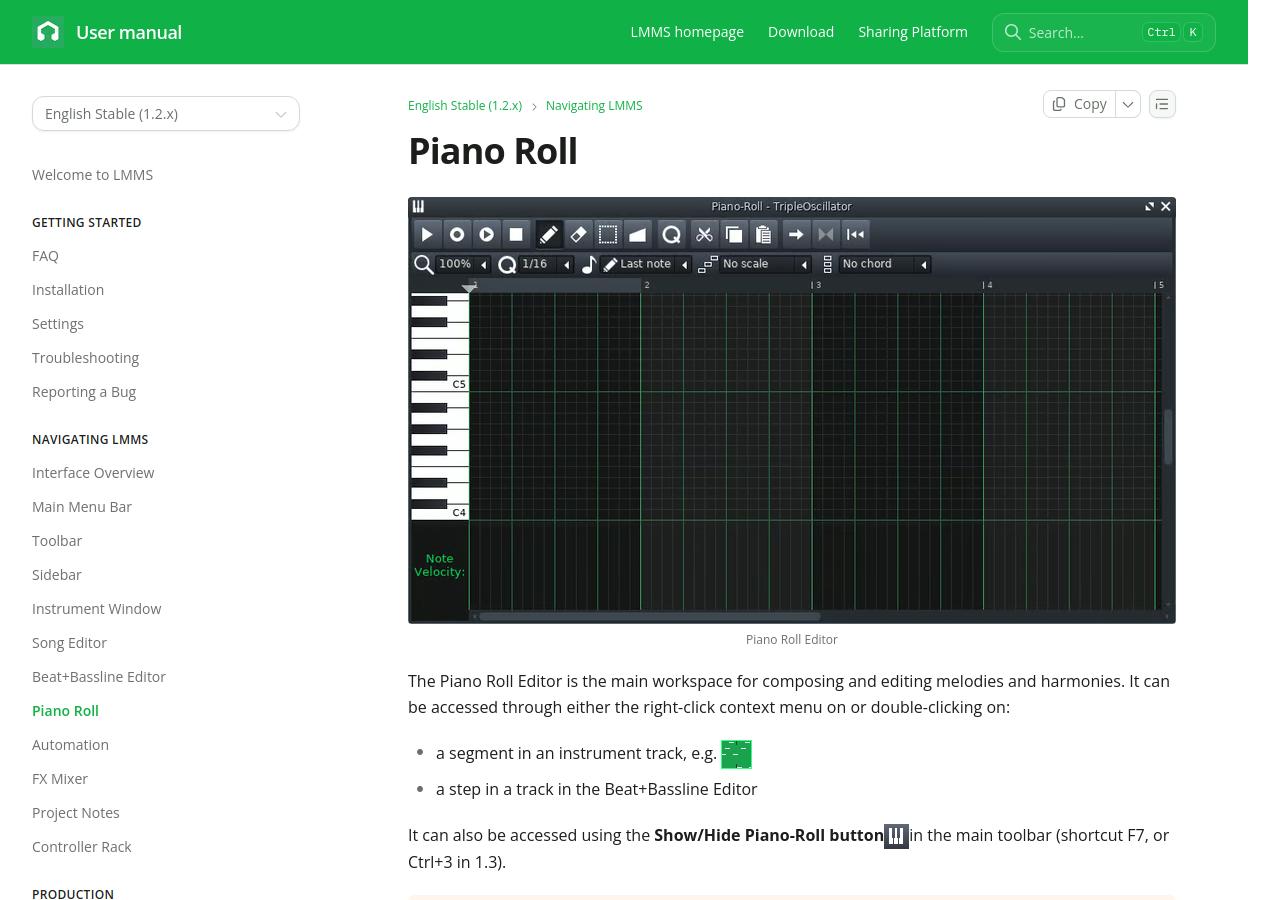
Check which release you are getting. The download page lists stable 1.2.2 alongside 1.3.0-alpha.2 for Windows, macOS and Linux. The latter arrived in September 2026, but remains a development release. Its notes warn about crashes, possible project-file damage and files that cannot reopen in older versions. For assessed work, agree on a version with your tutor and keep a separate backup before trying an alpha.
Stable LMMS 1.2.2 is a sequencing choice, rather than our recommendation for recording a microphone. Direct audio recording remained development work after that release, as the developers' progress report explains. Importing an existing recording is a different task from recording a vocal directly into a session. A singing or acoustic-performance assignment is more conveniently handled in one of the recording DAWs above.
A simple LMMS exercise might use a four-bar bass pattern and a melody that changes on its second appearance. That gives you something concrete to assess: whether the repeat develops the idea, and whether the bass supports the new phrase. The first version can be quite sparse.
Make the hand-in work on another computer
A session that plays perfectly on your laptop can still arrive with missing audio or unavailable instruments. Before submission, copy or collect the required recordings into the project using your DAW's project-management tools, and check the copied version. If the tutor needs an editable project, ask whether third-party plug-ins are acceptable.
For separate audio parts, use a common start point and matching export lengths, keeping any leading silence. Ableton's guide to exchanging stems and parts explains this alignment principle. The example below shows why a late entrance still needs a file that starts with the others.
Example: an eight-bar arrangement
This is also a useful distinction when someone asks for “stems.” They may mean grouped elements, such as drums and vocals, or they may actually want every individual track. Ask before exporting a large project. Include the tempo and the requested sample rate in a short note, and follow the brief on whether to include effects.
Finally, listen to the exported file outside the DAW, from beginning to end. Check that it contains the intended take and the full ending. A file named final can easily turn out to be yesterday's version. Downloading the uploaded submission and opening it once more is a useful last check.
Try a short project before starting the assignment
For your first evening, aim for a short arrangement you can save and export. Eight bars with two or three parts is enough to learn the basic route through a DAW. Use included sounds initially, and save the project in a clearly named course folder. Once that works, add the recording setup or extra instruments the assignment actually needs.
Before committing a larger piece to it, run through this short check:
Ready for the assignment?
- The project reopens with its sounds and recordings intact.
- The audio export plays in a separate player.
- The tutor can open the required submission format.
- A second copy exists somewhere other than the working folder.
You will probably discover one awkward step: selecting an input, finding an export setting, or locating a saved recording. Write that step down while it is fresh. The next session can then begin with the music already open, instead of another search through the setup menus.


