Photo: Tima Miroshnichenko / Pexels.
You can hum a chorus all the way through, then sit at the piano and lose it after the first two notes. The tune is familiar; finding its pitches and accompaniment is a separate task. Apps can help with that, especially when they let you hear a short phrase repeatedly and make an attempt before showing the answer.
Which part of playing by ear needs help?
There are several things you might mean by learning piano by ear: picking out a melody, recognising its notes within a key, or building an accompaniment from a recording. Our recommendations follow those jobs. Piano Melody is a useful starting point for short, familiar tunes; Functional Ear Trainer helps with tonal hearing; Transcribe! gives you close control over a recording. Chord ai belongs later, when you want to compare your harmony with an automatic suggestion.
For keeping the work together, Practis, our practice diary, lets you log the song and leave a specific next-step note. Something like “verse melody found; bass still unclear at the second chord” is enough. It does not listen to a recording and teach you its notes. The four tools below handle the listening and song work.
This is the practical starting cost and device requirement for each, checked on September 8, 2026. Store purchases vary by region and platform.
- Piano MelodyiPhone, iPad and Android
- Free download with advertising and paid upgrades. Begin with a tune from its built-in library; the songs focus on melody excerpts.
- Functional Ear TraineriPhone, iPad and Android
- Free download with paid options. Check the payment screen for the offer and billing period; the developer also publishes subscription terms.
- Transcribe!Windows, macOS and Linux
- 30-day free evaluation, then US$39 plus applicable local taxes. Desktop software; no phone or tablet version.
- Chord aiiPhone, iPad and Android
- Free basic version. Optional Pro subscription adds features; prices and feature sets should be checked in your device's store.
A full aural curriculum is a different purchase. Our ear-training app comparison covers dictation, sight-singing and exam-style work in more depth.
Piano Melody: start with a tune you already recognise
Piano Melody, from Learn To Master, lets you hear a song excerpt and reproduce it on an on-screen keyboard. Its App Store description lists adjustable playback speed, practice on selected parts, resizable keys and the option to switch note highlighting off. That last control is especially relevant here: with highlighting enabled, your eyes can supply an answer before your ears have worked it out.
We would start with an excerpt you could sing without the app. Listen to a few notes, pause, and try to reproduce them with the highlighting off. When you miss, replay the same small group. A whole chorus can contain too much information to remember while you are still searching for the opening pitch.
The on-screen keyboard makes this convenient away from home, but finding a tiny touch target differs from reaching for a physical key. At your piano, use the app as the sound source and repeat the phrase on the instrument as well. You can compare the two by listening even without an automatic score for your physical performance.
The catalogue's melodies are excerpts, such as a chorus or introduction, rather than a promise of complete two-handed arrangements. That suits the first stage of learning a song by ear. Expect to do separate work on the bass, chords and fingering before the result sounds like a finished piano version. The Android listing also describes adjustable speed and hidden-note practice, so this approach is available beyond Apple devices.
Functional Ear Trainer: hear where the melody sits in the key
When every next note feels like a fresh guess, Functional Ear Trainer is worth trying alongside the tune. Its central approach is to recognise a pitch in the context of a key, using Alain Benbassat's method. The developer's description explains this as learning the role each tone has within that key. In C major, E is the third degree; in G major, B has that same role.
That relationship gives you something portable. You can hear a melody moving through the third, second and first degrees even though the letter names change. The following miniature example shows the same descending shape in two major keys. Play each row slowly, then hum it with the piano silent.
One shape, two keys
Play the tonic chord first: C–E–G, then G–B–D for the second version. Listen for how the final note settles against that chord.
You can bring that small exercise back to a song. Once you have found a short phrase, identify its home note and try starting the phrase in another key. There is no need to transpose the entire arrangement. Three or four notes are enough to reveal whether you remember the sound relationships or mainly the places your fingers visited.
Functional Ear Trainer is free to install on iPhone and iPad as well as Android, with paid options. Its subscription terms describe automatic renewal, so check the offer shown to you before accepting an upgrade. You can decide whether this kind of listening is useful before building a longer routine around it.
Transcribe!: work out the recording you actually want to play
A built-in song library eventually runs into a simple problem: the version you love may not be in it. Transcribe! works with audio files on your computer. It can slow playback without changing pitch, save named loops and add markers, so you can return to the same fragment without repeatedly dragging a progress bar. It also offers a clickable reference keyboard and tools that suggest notes and chords. These functions are described on the official overview.
For piano, a useful first job is isolating the opening of a melody from a recording you already have. Make the loop long enough to hear the phrase's rhythm, with a little space before its first note. Slowing it moderately may help; slowing it so far that each attack loses its relationship to the next can make the phrase harder to recognise.
Seventh String's gallery shows how the waveform, markers and piano-keyboard analysis fit together. You can select a small stretch of sound for closer inspection while retaining its position in the track.
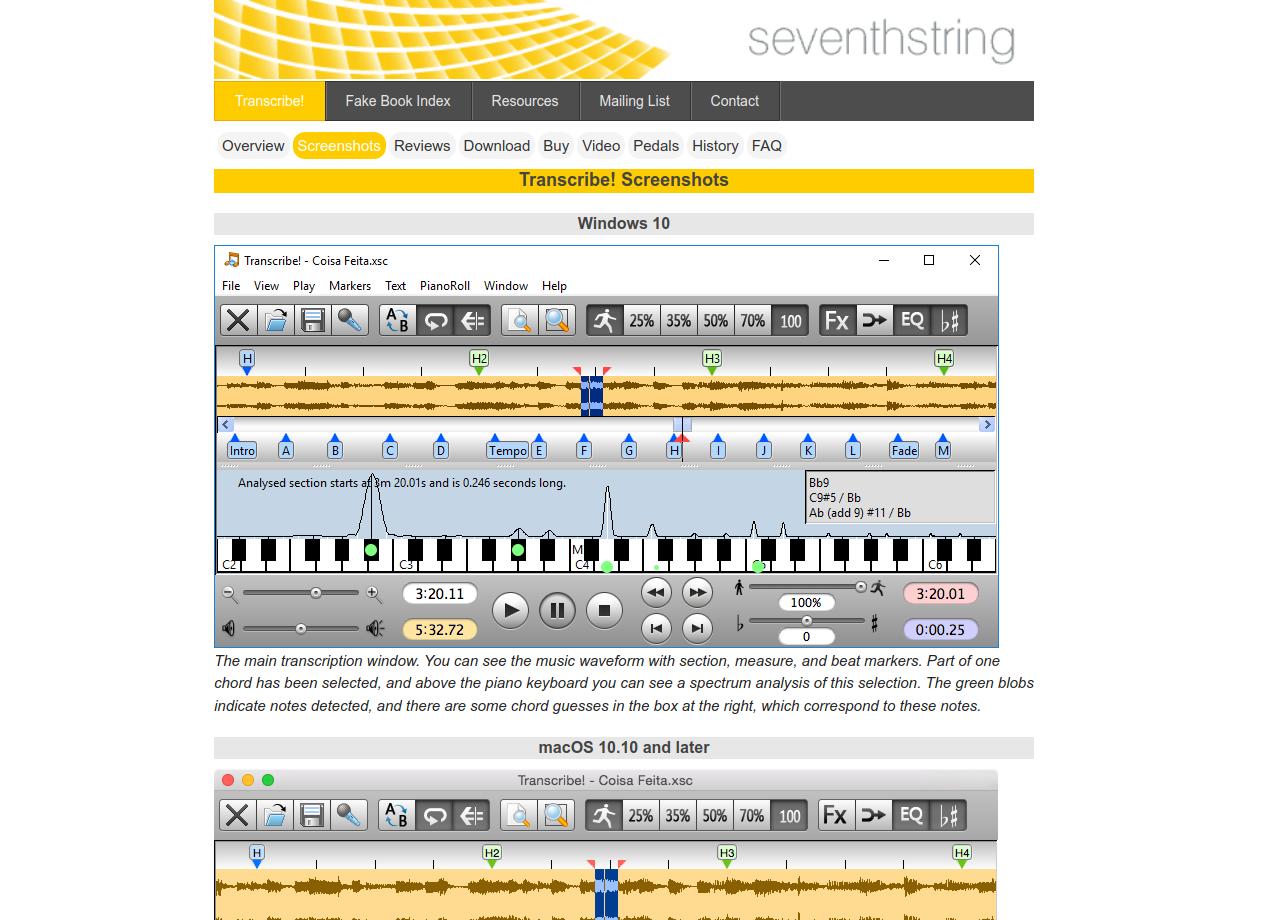
The analysis needs interpretation. A strong peak can be a harmonic of a played note, and several instruments can overlap. Treat a chord suggestion as something to sound at the keyboard and compare with the recording. Seventh String itself cautions that its guesses do not do the whole transcription for you.
This is a desktop option for someone who can already find at least a simple phrase by ear. The purchase page lists US$39 plus local taxes after the evaluation period. Try it with an ordinary audio file you can open on your computer; do not assume a download inside a streaming subscription is an importable file. For interpretation once the notes are found, our post on learning from recordings considers what to borrow from a performance.
Chord ai: a second opinion on the accompaniment
Chord ai is useful when you have some of the melody but are unsure what belongs underneath. The official site describes chord recognition from audio files and the device microphone, with piano chord diagrams. The free Android edition recognises basic chord types; its store listing places more advanced recognition, including inversions, in Pro.
For ear practice, make a guess before looking. Find a bass note, try a simple chord above it, and listen to the recording again. Then compare with the app. When the answers differ, isolate that moment and check the bass separately from the upper notes. A mismatch is a useful place to spend attention, although the app's label should not settle the question on its own.
A chord symbol also leaves a lot undecided. C/E means C major with E in the bass; it does not tell you which octave to use, how to distribute C and G between the hands, or which rhythmic pattern the pianist played. Even a correct chart gives you harmonic information that still needs arranging at the keyboard.
The pricing FAQ confirms a free basic version and monthly or yearly Pro subscriptions. Start by checking one recording with basic access. Paying for more detailed chord names is easier to justify once you can hear and use the simpler ones.
A first session: finish one short phrase
Begin with a melody you know well, preferably one with a clear single vocal or instrumental line. Listen to a short phrase twice. Hum it once without playback, then find the starting note at the piano. An approximate singing voice is fine for this task; the purpose is to keep the phrase in mind while your fingers search.
Work through the melody with one hand. When a note sounds wrong, return to the preceding note and listen for whether the line rises, falls or repeats. Keep enough of the rhythm that you still recognise the tune. Once the phrase is stable, try a bass note at a point where you hear the harmony change. Add a simple chord only after that bass note sounds convincing.
You may finish with four melody notes and one plausible bass note. That is a workable result for an early session. Leave a note about the exact place where you stopped, then begin the next session by playing what you remember before reopening the app. If you want a regular listening block alongside this song work, our 10-minute ear-training routine gives it a place in the week.
There is no need to install all four tools at once. Start with a familiar melody in Piano Melody, or with a short recording in Transcribe! if you already find simple tunes by ear. Add the tonal-hearing exercises or chord checking when you reach a particular difficulty you can name.